Automatically collect detailed info from YouTube videos of popular creators for content analysis.
Implementation:
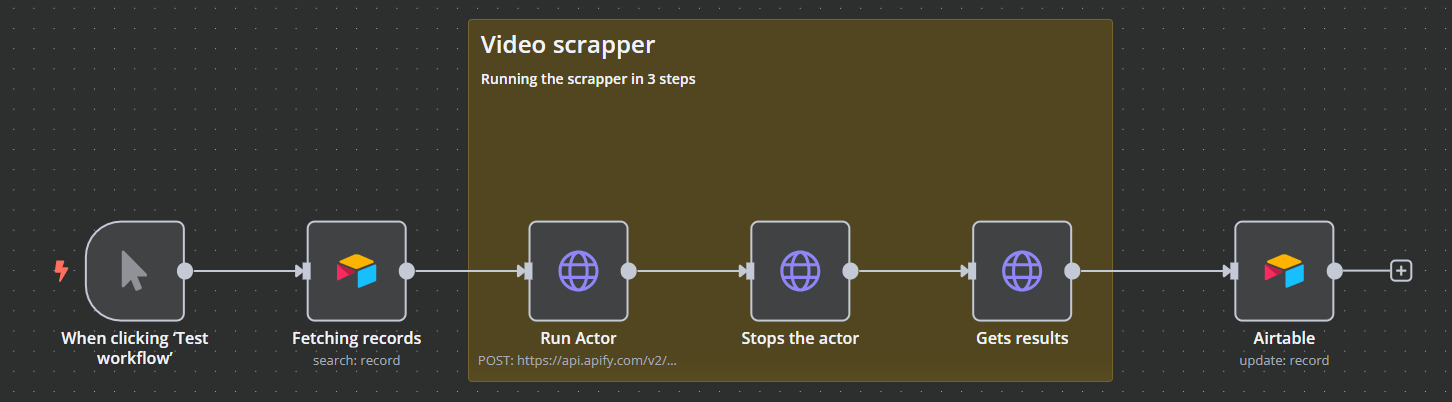
The workflow pulls the url from your database, scrapes their details using a scraping tool, waits for results, and then saves everything back to the database.
Outcome:
Triggered by a Click: You hit “Start” to run the process.
Grabs Video Links: It picks up YouTube links marked as “ready” in your Airtable.
Runs the Scraper: Sends each link to an automation tool that fetches all available video details (title, channel name, views, likes, subtitles, description, and thumbnail).
Waits for Results: Gives the scraper time to finish collecting the info.
Saves Everything Back: Once done, all the data is pushed back into Airtable, organized and ready for your analysis.