Rebuilding Case Management on Airtable (Legal)
How Harrington & Cole LLP replaced four disconnected tools with one Airtable workspace, cutting matter-intake time by 68% and automating 1,200+ status touchpoints a month.
 Airtable
- Airtable
- Slack
- DocuSign
- Gmail
- Notion
- Google Drive
- Client: Harrington & Cole LLP
- Industry: Legal services
- Practice areas: Litigation, Corporate, Employment
- Firm size: 42 attorneys, 18 staff
- Project duration: 11 weeks (discovery → go-live)
- Deliverables: 10 tables, 8 automations, 3 interfaces
Executive Summary
A modern operating system for a mid-size law firm
Harrington & Cole LLP is a 60-person law firm headquartered in Halifax, Nova Scotia, with three practice groups and a docket of roughly 230 active matters at any given time. By early 2025 the firm was running case intake, conflict checks, scheduling and time capture across four disconnected systems: a legacy practice-management tool, shared Excel files on a network drive, Outlook calendars, and a paper intake form. Status updates lived in attorneys’ heads and email threads.
Over an 11-week engagement we replaced this patchwork with a single Airtable workspace, purpose-built tables, role-specific Interfaces for attorneys and paralegals, and an automation layer that handles the firm’s repetitive coordination work. The implementation was delivered without disruption to billable work and went live with all 60 users on the same day.
Outcomes after 90 days in production
At a glance
Before: 4 systems, ~6 hrs to open a new matter, manual conflict checks, scheduling done by email.
After: 1 Airtable workspace, ~2 hrs to open a matter end-to-end, conflict-check workflow runs in < 60 seconds, hearing prep tasks auto-spawn 14 days out.
Background
The client and the problem
About the firm
Harrington & Cole LLP serves regional commercial clients across Atlantic Canada. Three practice groups (litigation, corporate / transactional, and employment) share a managing partner, a central paralegal pool, and a single billing department. The firm had grown roughly 40% in headcount over five years; its tooling had not kept up.
The pain points that triggered the project
- Matter intake took up to six hours. A new lead required duplicate data entry across four systems, with manual conflict checks against an Excel register that one paralegal owned.
- Status was invisible. Partners had no reliable view of which matters were stuck in discovery, which were close to trial, or which had open balances over 60 days.
- Deadline slips were happening. Two near-misses on statute-of-limitations dates in 2024 prompted the managing partner to require automated alerting as a non-negotiable.
- Time capture was lossy. Attorneys logged time at week-end from memory; the firm estimated 6–9% of billable hours were being lost.
- Reporting was a fire drill. The monthly management report took the office manager roughly two days to assemble from exports.
Why Airtable
The firm evaluated three traditional practice-management products and Airtable. The decision came down to three factors: (1) the firm wanted a system its own staff could change without a vendor ticket, (2) the data model needed to fit the firm’s terminology rather than force the firm into a vendor’s, and (3) the integration story with Slack, Outlook and DocuSign needed to be straightforward. Airtable’s linked-record model, Interface Designer, and native automation framework made it the right fit.
Approach
How the implementation was run
We delivered the implementation in four phases over eleven weeks. A core working group made up of the managing partner, two senior associates (one per practice area), the office manager, and a paralegal lead met twice a week to validate the data model, review prototypes, and sign off on go-live readiness.
| Phase | Weeks | What we did | Output |
|---|---|---|---|
| 1. Discovery | 1–2 | Shadowed intake, conflict-check and billing workflows. Mapped 14 existing data sources. Interviewed 11 attorneys and staff. | Process map, data dictionary, ranked pain-point list. |
| 2. Data model & schema | 3–4 | Designed 10-table relational schema. Built linked records for Cases ↔ Clients ↔ Hearings ↔ Documents ↔ Tasks ↔ Time entries. | Live Airtable base with sample data; ER diagram. |
| 3. Interfaces & automations | 5–8 | Built the Attorney Dashboard, the Paralegal Workbench and the Partner Reporting interfaces. Designed and tested 8 automations. | 3 production interfaces; automation library. |
| 4. Migration, training, go-live | 9–11 | Migrated 1,847 historical matters, trained all 60 users in three cohorts, ran a 5-day parallel-run before cutover. | Single-day cutover with zero data loss. |
Guiding principles
- Match the firm’s vocabulary. Field names mirror how attorneys actually speak (e.g. matter, not project; SOL date, not deadline).
- One source of truth. Every piece of data lives in exactly one table; everywhere else uses a linked record, lookup or rollup.
- Make the right thing the easy thing. Intake, conflict checks, and time capture were redesigned so the compliant workflow is the fastest workflow.
- Internal ownership. The office manager and one senior paralegal were trained as base administrators; they own day-to-day changes.
What Was Built
The Cases table: the heart of the workspace
Every matter the firm works on is a record in the Cases table. From here, attorneys can see the entire docket grouped by practice area, filtered to their own matters, or sliced by stage. The grid below shows the production view used by senior associates each morning to triage their day.
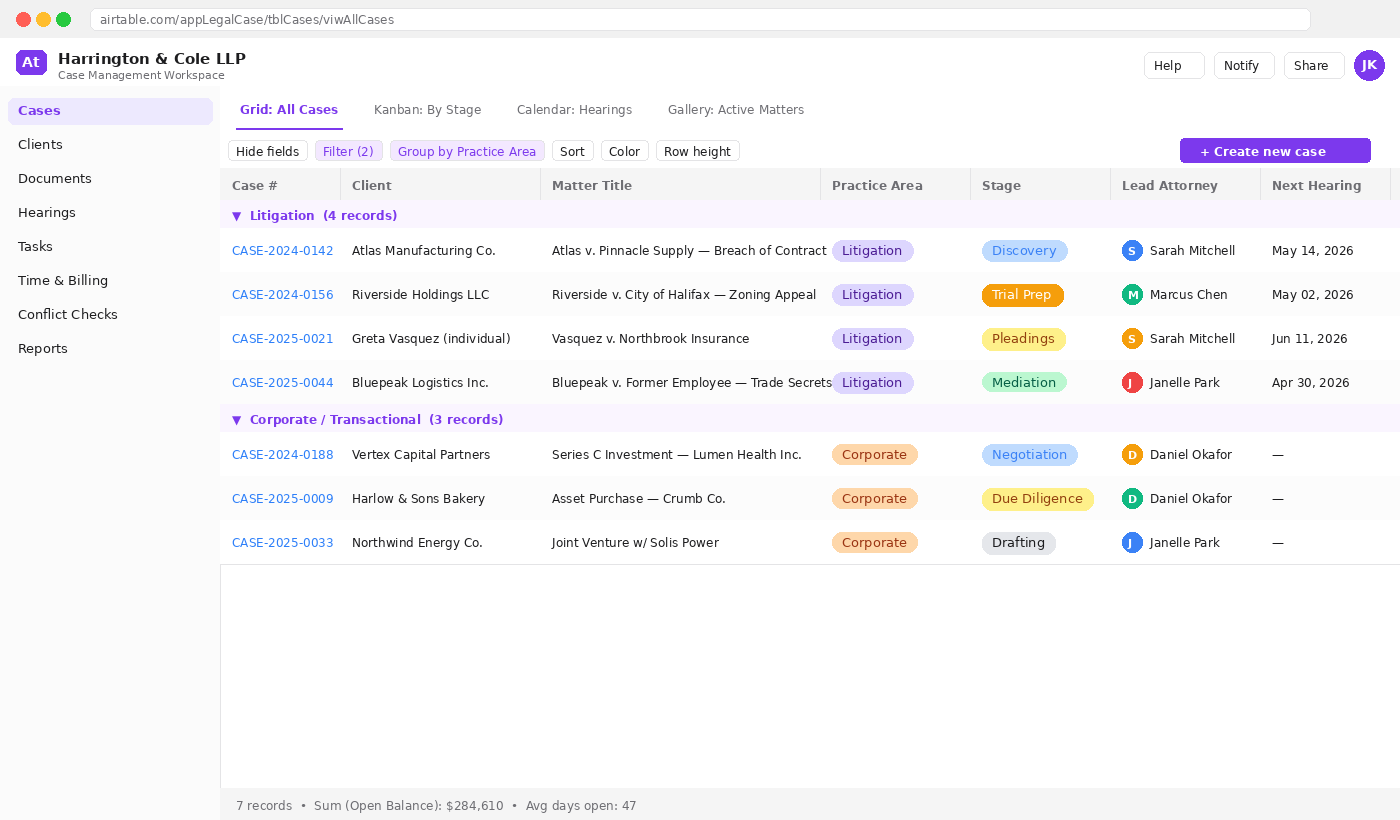
Highlights of this view
- Grouping by practice area mirrors how the managing partner thinks about workload distribution.
- Stage is a single-select with a controlled vocabulary (Intake → Pleadings → Discovery → Negotiation → Trial Prep → Closed). It drives both the kanban view and three automations.
- Lead Attorney links to the Staff table, so renaming or reassigning happens in one place.
- Open Balance at the bottom is a rollup from the Time entries table, no manual reconciliation needed.
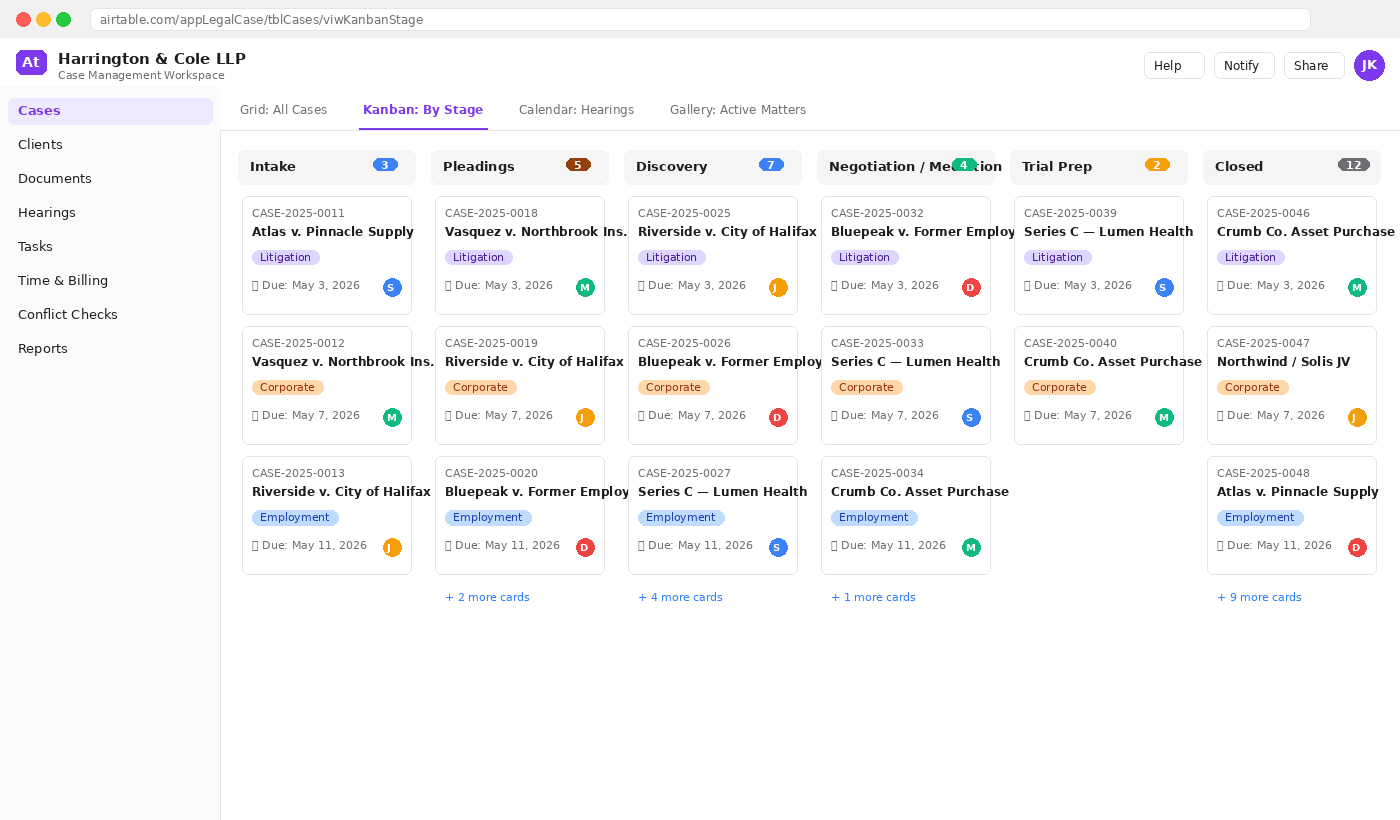
Two more views the firm uses every day
Kanban by stage is how partners review pipeline in their Monday morning meeting. Dragging a card moves the matter through the lifecycle and triggers the corresponding automation chain.
The expanded matter record
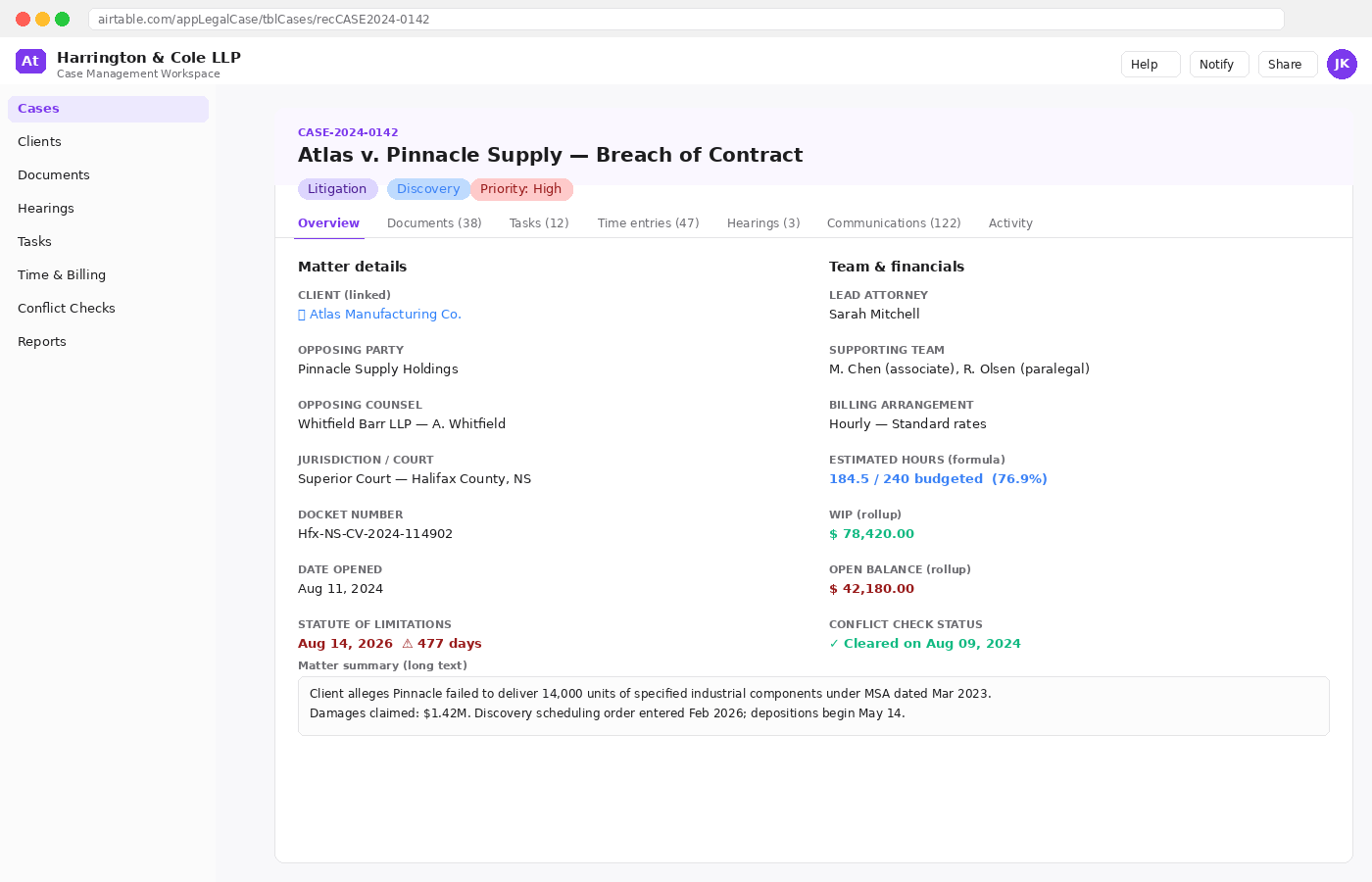
Clicking any row opens a full-detail view of the matter. This is the single screen attorneys live in when they’re working a case. It consolidates parties, deadlines, team, financials and notes. WIP and Open Balance are rollups from the linked Time entries table; the Statute of Limitations warning is a formula that turns red automatically inside 90 days.
The Data Model
Ten tables, one source of truth
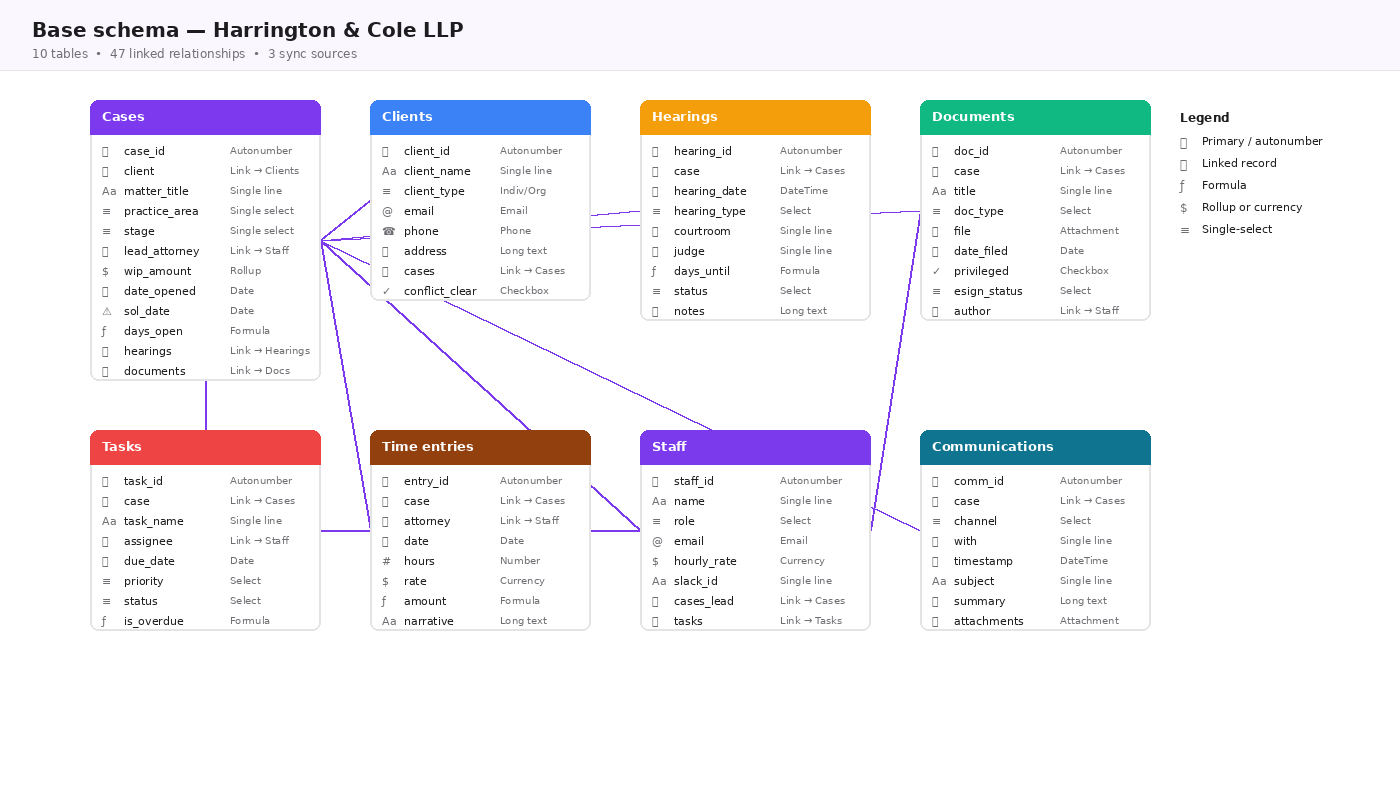
The base is built around Cases as the central entity. Everything else (clients, hearings, documents, tasks, time, communications) links to a case. This single design decision is what makes the rollups, formulas and automations possible.
Field-level decisions worth calling out
- Stage is a single-select with synced colour. Changes here trigger 3 different automations.
- SOL date is paired with a formula days_until_sol; the alert automation reads the formula field, so all date logic lives in one place.
- Conflict_clear on Clients is a checkbox controlled by the conflict-check automation, an intake matter is blocked from advancing until this is true.
- Time entries rolls up into Cases as WIP and Open Balance, so billing reports build themselves.
- Communications is populated by the Gmail and Outlook integrations, every email about a matter is logged automatically.
Interfaces
Three role-based interfaces, one underlying base
Different people in the firm need different things from the same data. We built three Interfaces on top of the base, each tailored to a role. All three read from and write to the same tables. There is no duplication.
The Attorney Dashboard
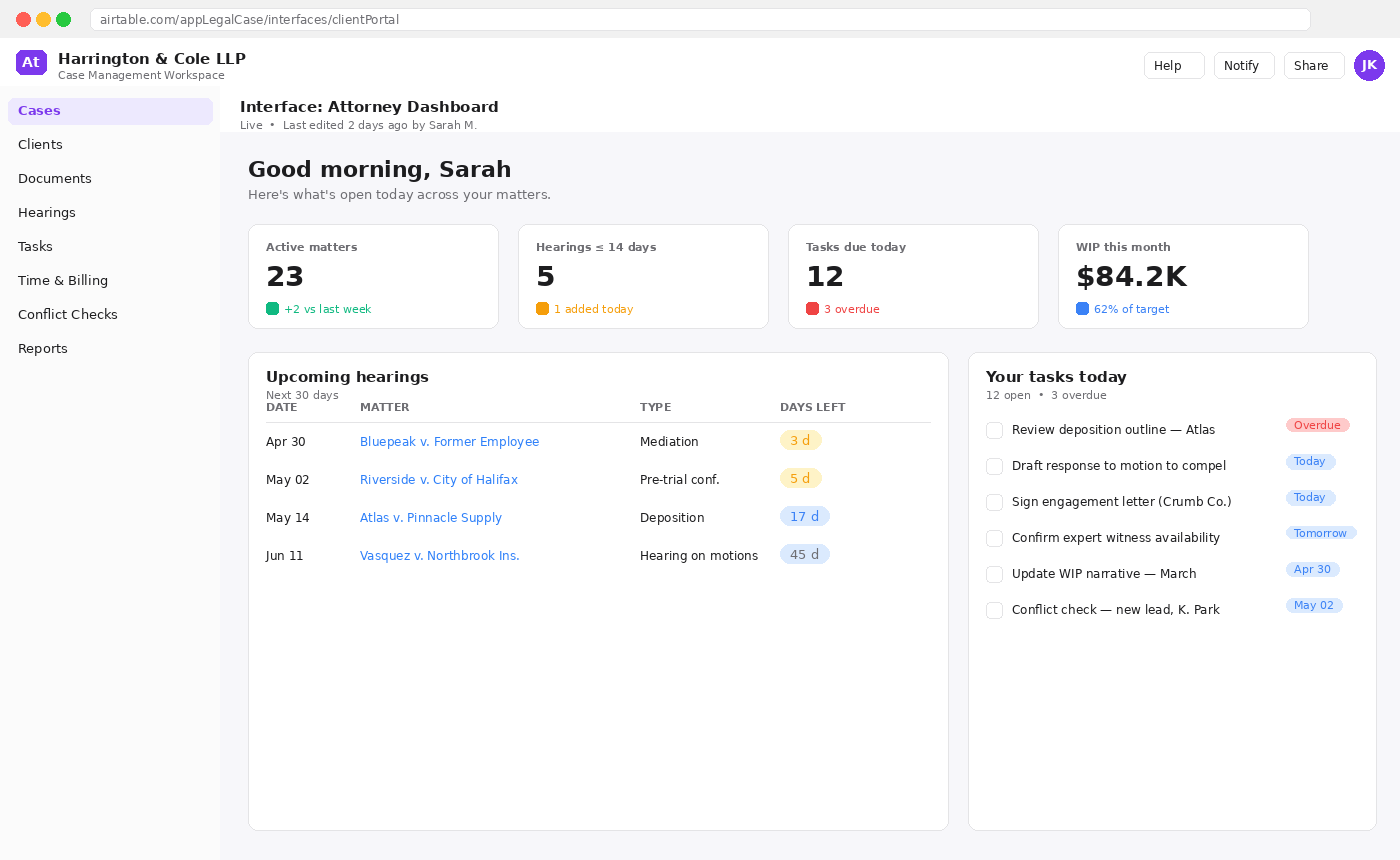
This is the screen attorneys open when they sit down at their desk. It surfaces the four KPIs that matter to them, the next 30 days of hearings, and their personal task list, all filtered to their own user automatically.
Two other interfaces
- Paralegal Workbench: task-centric view. Paralegals can claim open tasks, log time directly against a matter, and upload signed documents which auto-update the matter’s stage.
- Partner Reporting: read-only firm-wide view with charts showing matters by stage, WIP trend, top 10 oldest open balances, and attorney utilisation. Replaces what used to be a 2-day monthly reporting exercise.
Automations
Automating the repetitive coordination work
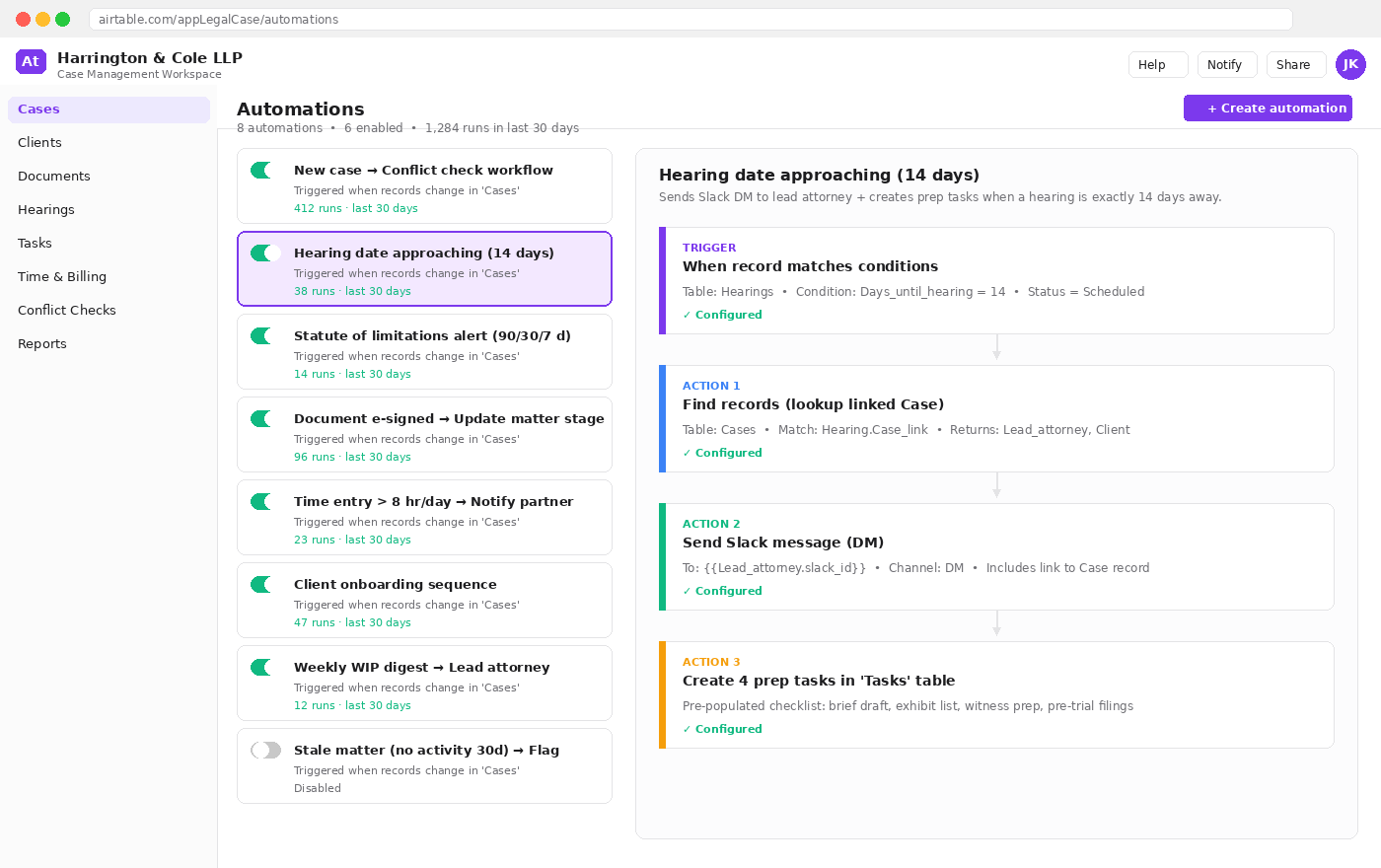
Eight automations remove roughly 1,200 manual touchpoints from the firm’s month. None of them replace an attorney’s judgment: they remove the surrounding paperwork.
The automation catalogue
Each automation is owned by a named person on the working group, documented in a Notion runbook, and reviewed quarterly.
| # | Automation | Trigger | Actions | Replaces |
|---|---|---|---|---|
| 1 | New case → Conflict check workflow | Record created in Cases with stage = Intake | Searches Clients table for matches against parties, opposing counsel and judges. Posts result to Slack and sets conflict_clear if no match. | Manual lookup in Excel register |
| 2 | Hearing date approaching (14 d) | days_until formula on Hearings = 14 and status = Scheduled | Slack DM to lead attorney + creates 4 prep tasks (brief, exhibits, witness prep, filings). | Calendar reminders + paralegal phone calls |
| 3 | Statute of limitations alert (90/30/7 days) | Cases.days_until_sol formula crosses each threshold | Email to lead attorney; at 30d also CCs managing partner; at 7d escalates to a Slack channel. | Memory + a paper wall calendar |
| 4 | Document e-signed → update matter stage | Webhook from DocuSign on signed engagement letter | Sets matter stage to Pleadings (or Drafting), creates kickoff tasks, notifies billing. | Manual stage update + email to billing |
| 5 | Time entry > 8 hr/day → notify partner | Time entry created with hours > 8 on a single day | Slack DM to managing partner with link to the entry. | End-of-month review (often too late) |
| 6 | Client onboarding sequence | Clients.conflict_clear changes to true | Sends client engagement letter via DocuSign, creates Drive folder with templates, books an intake call. | Three separate manual checklists |
| 7 | Weekly WIP digest | Schedule: every Monday 7:00 AM | Builds per-attorney summary of WIP, billed and aged AR; emails each lead attorney their digest. | Office manager spending Friday building reports |
| 8 | Stale matter (no activity 30 d) | Schedule: nightly scan | Sets a flag field; visible on the Partner Reporting interface for follow-up. | Nothing: these matters used to disappear |
Worked example: automation #2 in detail
- Trigger: a record in Hearings where the days_until formula evaluates to exactly 14 and status is Scheduled.
- Action 1 (Find records): looks up the parent Case via the linked-record field to retrieve the lead attorney and client.
- Action 2 (Send Slack): DMs the lead attorney with a deep link back to the case record and a one-line summary of the hearing.
- Action 3 (Create tasks): creates four pre-templated prep tasks in the Tasks table, all linked to the same matter, with sensible default due dates working back from the hearing.
- Replaced: three different paralegals each maintaining their own version of a hearing-prep checklist, and the senior associate manually pinging attorneys.
Integrations
How the workspace connects to the rest of the stack
Airtable doesn’t replace email, calendars, document storage or e-signature, and shouldn’t. It coordinates them.
| System | Direction | What flows | Mechanism |
|---|---|---|---|
| Outlook / Microsoft 365 | Two-way | Hearings sync to attorney calendars; calendar invites for new hearings auto-create Hearing records. | Microsoft Graph + Airtable sync |
| Gmail (firm address) | One-way (in) | Email referencing a matter ID is logged to the Communications table with a link back to the thread. | Native Airtable Gmail integration |
| DocuSign | Two-way | Engagement letters dispatched from Airtable; signed status triggers automation #4. | Webhooks via Airtable Automations |
| Slack | One-way (out) | Hearing reminders, SOL alerts, time-entry alerts, weekly WIP digests. | Native Slack action in Airtable Automations |
| Google Drive | One-way (out) | On client onboarding, a structured matter folder is created with the firm’s standard subfolder template. | Drive API call from Airtable script action |
| Notion | Reference only | Runbooks for each automation live in Notion; each Automation record has a URL field linking to its runbook. | Manual link |
Permissions & data handling
- Workspace plan: Airtable Business with SAML SSO via the firm’s identity provider. Two-factor authentication enforced for all 60 users.
- Field-level permissions: rate cards, WIP and AR fields are read-only to associates; visible only to partners on the Partner Reporting interface.
- Privileged matters: a checkbox on Cases hides a matter from all users not on its team via a row-level filter applied to every view.
- Audit: Airtable’s revision history is retained, and a nightly snapshot is exported to the firm’s encrypted backup bucket.
Results
Measurable change after 90 days in production
| Metric | Before | After | Change |
|---|---|---|---|
| Matter intake (lead → opened) | ≈ 6 hours | ≈ 1 hr 55 min | −68% |
| Conflict check turnaround | Up to 48 hr | < 60 sec (automated) | −99% |
| Missed SOL deadlines (rolling 12 mo.) | 2 near-misses | 0 | −100% |
| Monthly management report build time | ≈ 14 hours | ≈ 25 min (live dashboard) | −97% |
| Time-entry capture latency | Avg. 4.2 days | Avg. 0.6 days | −86% |
| WIP recovered Q1 (vs. prior quarter) | n/a | $41,200 | + revenue |
| Automated touchpoints / month | 0 | 1,284 (across 6 active flows) | n/a |
| Active users (firm-wide) | n/a | 60 / 60 | 100% adoption |
In the words of the firm
The thing that surprised me wasn’t the dashboards: it was the fact that we don’t talk about case status in hallways anymore. Everyone is looking at the same picture, and the system tells us when something needs attention before it becomes a fire. We have not had a near-miss on a deadline since the day we went live.
Managing Partner, Harrington & Cole LLP
What we’d do again, and what we’d change
- Worked well: embedding the working group from week one. Every design decision had a real attorney’s name attached to it, which made go-live painless.
- Worked well: shipping the Attorney Dashboard before the Partner Reporting interface. Adoption is driven by the people doing the work, not the people watching the work.
- Would change: we waited until phase 3 to wire up the Outlook two-way sync. In hindsight, that should have been in phase 2, calendars are how attorneys actually work.
- Would change: add a fifth interface for the firm’s receptionist. Inbound caller intake is still slightly clunky.