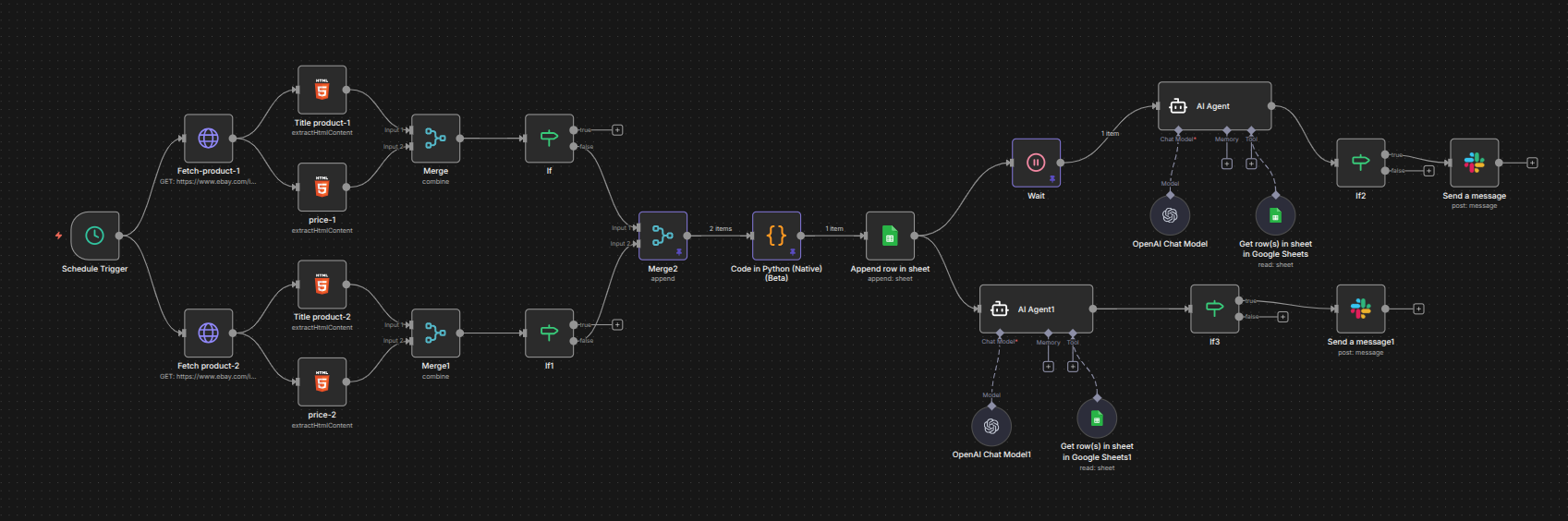
AI-Powered E-Commerce Product Price Monitoring
A scheduled workflow that tracks product prices, logs history to Google Sheets, and alerts you only on meaningful price drops.
 n8n Automations AI Agents
- n8n
- Google Sheets
- Slack
- OpenAI
- Gemini
1. The Problem: Manual Price Checking Wastes Time
Before automation, tracking product prices across online stores was slow, repetitive, and error-prone:
Users had to manually
- Open multiple product pages
- Check prices repeatedly
- Record or remember previous prices
Often missed opportunities
- Price drops
- Limited-time deals
- No historical visibility into price trends
- Buying decisions were based on guesswork rather than data
Impact per user
- 30–60 minutes per day spent manually checking prices
- Missed savings on deals and discounts
- Decisions based on incomplete information
Core challenge: People want to buy at the right time but don’t want to constantly monitor prices themselves.
2. Results After Automation
Once the automation was implemented
- Price monitoring happens automatically every day
- Alerts are sent only when meaningful changes occur
- Users make data-driven purchasing decisions
- Historical price trends are logged and accessible
- No human involvement is needed for routine checks
Time & Effort Savings
Before
45 minutes/day × 30 days ≈ 22.5 hours/month
After
- Fully automated
- Humantime required = near zero
Monthly impact
- ~20–25 hours saved per user per month
- Equivalent to freeing 0.5 full-time workdays per user
Accuracy & Opportunity Gains
- 100% of monitored prices captured accurately
- Never miss a price drop or limited-time deal
- Improved buying decisions based on AI analysis
3. The Solution: AI-Powered Price Monitoring System
This automation acts as a virtual price tracker and analyst:
- Scheduled scraping collects product prices automatically
- Google Sheets logs historical prices
- AI evaluates trends and identifies best-value opportunities
- Notifications sent via Slack, email, or preferred channels
- Only meaningful changes trigger alerts, reducing noise
4. How the System Works
Phase 1: Scheduled Price Collection
Workflow runs automatically (daily, or custom schedule)
Visits product pages and extracts
- Product name
- Current price
- Skips incomplete or erroneous entries
Phase 2: Price Comparison & History Logging
- Prices for multiple products are compared
- Each run adds a new row to Google Sheets
- Builds a complete price history over time
Phase 3: AI-Driven Analysis
AI evaluates
- Current price vs historical prices
- Which product offers the best value today
- Significant changes worthy of notification
Phase 4: Smart Notifications
Sends alerts only when
- Price drops significantly
- A better deal appears
- Stays silent if no meaningful change occurs
- Notifications sent via Slack, email, or other channels
- Notification
5. Business Value
- Zero Manual Monitoring: No human effort required for routine checks
- Never Miss a Deal: Immediate alerts for better prices
- Data-Driven Decisions: AI identifies the optimal product choice
- Historical Visibility: Full record of price trends for smarter buying
- Reduced Noise: Only meaningful alerts, no unnecessary notifications
- Time & Cost Savings: ~20–25 hours/month saved per user
6. How You Can Duplicate This System
Open the JSON workflow
Click the attached file
E-Commerce Price Monitoring Automation.json
- Copy all content from the JSON file
- Open n8n (cloud or self-hosted)
- Log in to your n8n instance
- ➕ Create a new workflow
Click New → Workflow
Name it temporarily; rename later
Import / Paste the JSON
- Paste the copied JSON into the workflow editor
- n8n rebuilds all nodes and connections automatically
- Update credentials & connections
- Scheduler / Cron Node: Set frequency (daily, weekly, or custom)
- HTTP / Scraping Nodes: Update product URLs, test extraction
- Google Sheets: Add credentials, select spreadsheet and columns (Product, Price, Date, Comparison Result)
AI Analysis Node: Add API credentials (OpenAI / Gemini)
- Notification Node: Slack or email credentials, configure messages
- Run a full workflow test
- Manually execute the workflow
Verify end-to-end
- Data collection → analysis → notification
- Ensure no alerts if prices haven’t changed
- Enable the workflow
- Toggle workflow to Active
- System now monitors prices automatically, analyzes trends, and sends alerts only when necessary
7. Final Outcome
With this automation
- Price monitoring is fully automated
- Buying decisions are data-driven and timely
- Users save 20–25 hours per month
- Deals are never missed
- Alerts are meaningful and non-intrusive
This system turns slow, error-prone manual price tracking into a fast, reliable, and fully automated workflow.