Estato (Real Estate Management Dashboard)
A full-stack MERN real estate operations platform with CRUD, Google Auth, live charts, and Cloudinary image management, built on the Refine framework with Material UI.
- React
- TypeScript
- Node.js
- Express
- MongoDB
- Cloudinary
- Google OAuth
- Type: Full-Stack MERN Application Case Study
- Product: Estato, Real Estate Management Dashboard
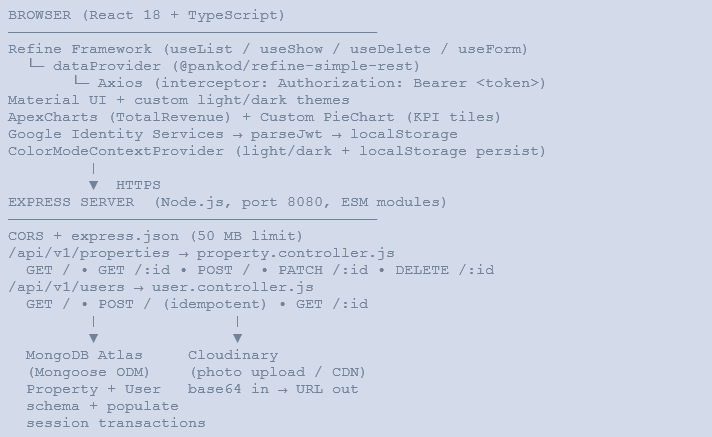
- Frontend: React 18 + TypeScript · Refine Framework · Material UI · ApexCharts
- Backend: Node.js + Express · ESM modules · port 8080
- Database: MongoDB Atlas via Mongoose ODM
- Auth: Google OAuth (Google Identity Services) · JWT · localStorage
- Media Storage: Cloudinary (property photo upload and delivery)
- Frontend Host: Vercel (demo: mern-dashboard-app.vercel.app)
- License: MIT
Why we built this
Real estate teams at any scale face the same structural problem: their properties, agents, and performance data live in disconnected places. Listing portals hold property records. Spreadsheets track agent performance. Photos are stored in email threads or local drives. There is no single screen that shows the full picture.
The core problems Estato was designed to solve:
- No centralised property database: listings were scattered across portals and spreadsheets with no consistent schema for type, location, price, or description
- Agent visibility was absent: managers had no way to see, at a glance, which agents held the most listings or how the portfolio was distributed across the team
- Creating and editing listings was slow: no standard form, no structured property types, and no direct photo upload meant listings were inconsistent and time-consuming to publish
- No dashboard-level KPIs: total properties for sale, total for rent, total customers, and total agents were metrics that required manual counting across multiple systems
- No referral source insight: the team could not measure which channels (social media, marketplaces, websites, digital ads) were driving enquiries
- Authentication was unmanaged: agents accessed tools via shared passwords with no individual accountability and no way to tie listings back to a specific user
The goal was a unified MERN-stack dashboard where every agent logs in with Google, can create and manage their own listings with photo upload, and managers can see live KPIs, revenue trends, and the full agent roster in one place.
What this system does
Estato is a full-stack MERN application that gives real estate teams a complete operations interface: live analytics, a full property CRUD system, an agent directory, individual profiles, and Google-authenticated access. The Refine framework handles data fetching, routing, and auth integration; Material UI provides the component layer; ApexCharts and custom donut charts deliver the analytics.
Operations dashboard
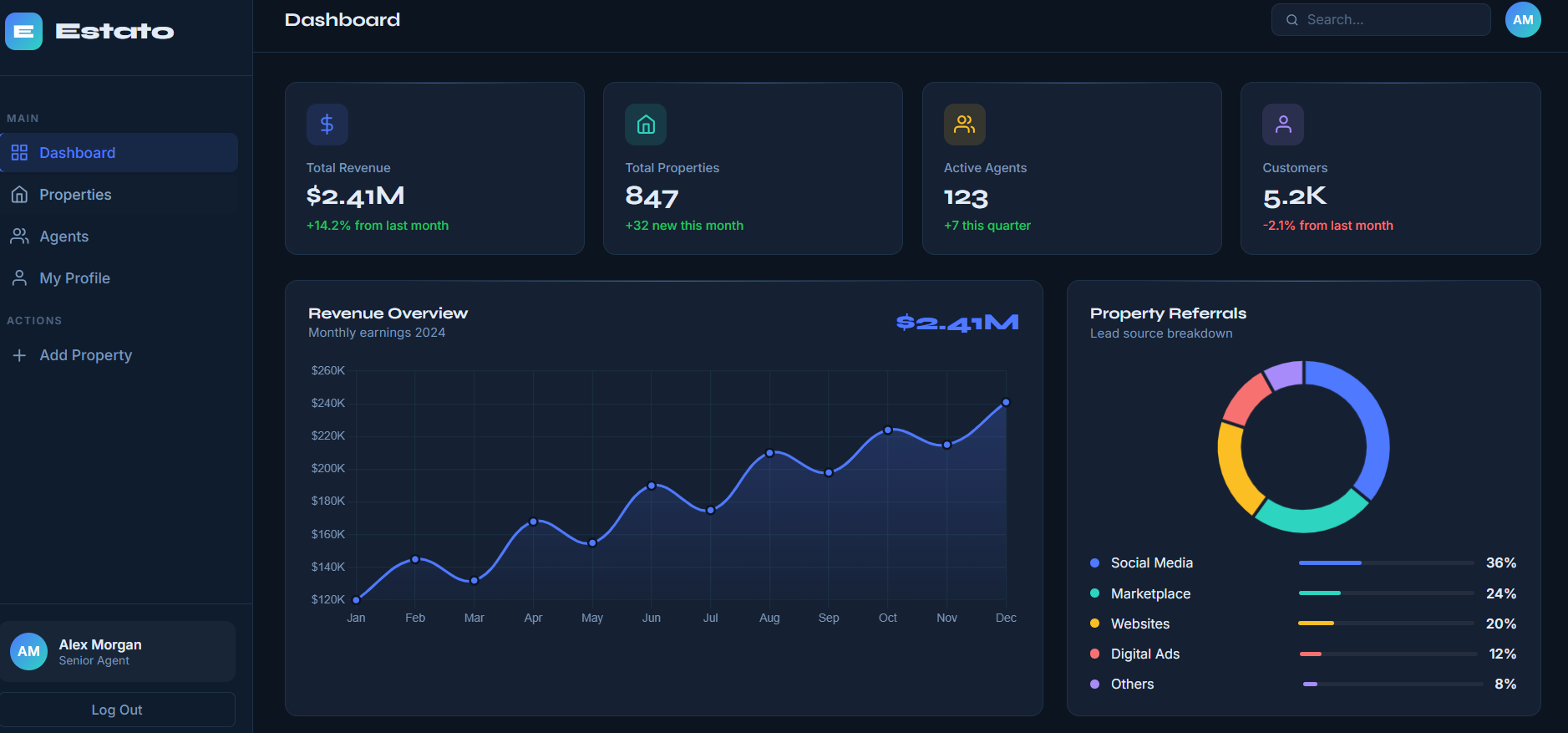
- Four donut-style KPI tiles at the top of the home page give instant visibility: Properties for Sale (live count from the API), Properties for Rent, Total Customers, and Total Agents, each with a percentage ring showing the proportion against a target
- Total Revenue area chart (ApexCharts) renders monthly revenue data across the full year with a smooth curve and gradient fill
- Property Referrals horizontal bar chart shows the contribution of each lead source: Social Media (64%), Digital Ads (80%), Websites (50%), Marketplace (40%), and Others (15%).
- Latest Properties section beneath the charts shows the 4 most recently added properties as live cards pulled from the API in real time
Property management (full CRUD)
- All Properties page renders the full listing catalogue as a responsive card grid, with live search by title, filter by 8 property types (Apartment, Villa, Farmhouse, Condos, Townhouse, Chalet, Studio, Duplex), price sort toggle, and server-side pagination with a configurable page-size selector (5, 10, 20, 30, 40, 50, All)
- Property Detail page shows the full-size property photo, property type with a 5-star rating, title, location, price, and description on the left. The right sidebar shows the creator agent’s avatar, name, property count, and location. Context-aware action buttons adapt based on the logged-in user: Message and Call for other agents’ listings; Edit and Delete for the current user’s own listings
- Create Property form collects title, property type, description, location, price, and photo. The photo is read into base64 via the FileReader API and submitted to the backend, which uploads it to Cloudinary and stores the CDN URL
- Edit Property form pre-populates all existing field values and allows any field to be changed, including the photo. If the photo is unchanged, the existing Cloudinary URL is preserved
- Delete uses a Mongoose session transaction to remove the property document and simultaneously pull it from the creator’s allProperties array, keeping both collections in sync atomically
Agent management
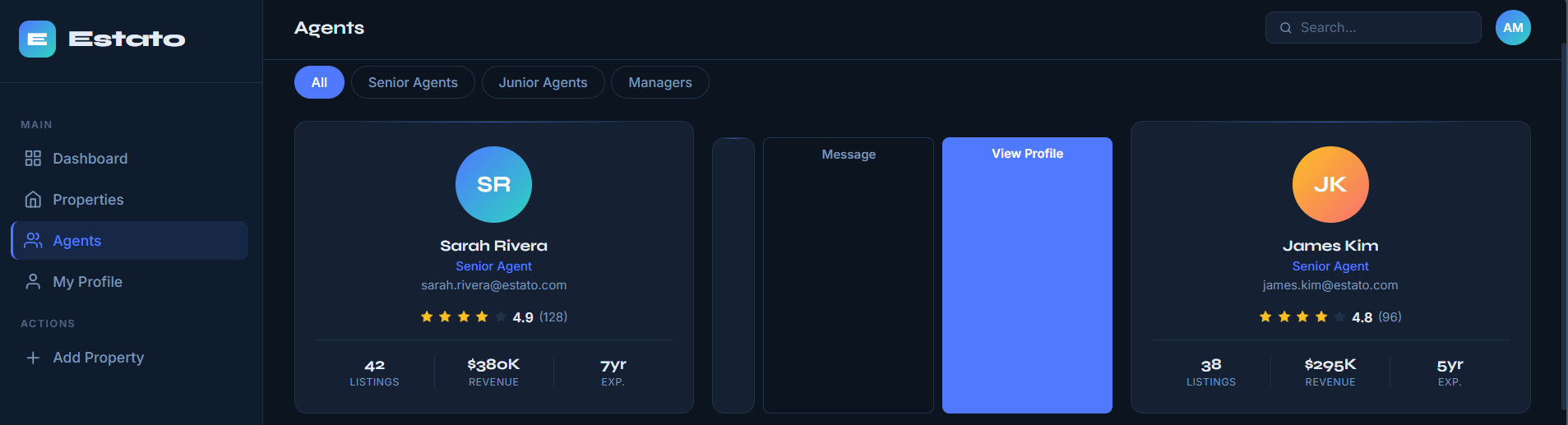
- Agents List page displays every registered user as an agent card with their Google avatar, name, email address, and total property count
- Agent Profile page shows the full agent detail view via the shared Profile component, including the agent’s complete property portfolio
- My Profile page uses the same shared Profile component for the currently authenticated user, with data fetched by their own MongoDB user ID
Authentication
- The login page renders a Google Sign-In button using the Google Identity Services API. The credential response is a signed JWT
- parseJwt utility decodes the Google JWT on the client to extract name, email, avatar (picture), and sub (user ID) from the payload
- On every login, the user profile is POST-ed to /api/v1/users, which is idempotent: it returns the existing MongoDB document if the email already exists, or creates a new user record if not
- The raw Google credential token is stored in localStorage as token. Axios’s request interceptor attaches it as Authorization: Bearer <token> to every subsequent API call
- On logout, token and user are removed from localStorage and google.accounts.id.revoke() is called to invalidate the Google session
Light and dark mode
- ColorModeContextProvider wraps the entire application and exposes a setColorMode function through React context
- The current mode is stored in localStorage to persist the user’s preference across sessions. On first load, the system’s prefers-color-scheme media query is checked to set the default
- Two custom Material UI themes are defined: overridedLightTheme and overridedDarkTheme, each extending Refine’s built-in theme objects with custom palette overrides. The active theme is passed to ThemeProvider at runtime
Benefits
- Single source of truth for the portfolio: every property, agent, and relationship lives in one MongoDB database with a consistent schema, accessible from any device
- Live KPIs on every login: four dashboard tiles give the team instant situational awareness without opening a single spreadsheet
- Consistent listing creation: the structured form with defined property types ensures every listing is created to the same standard, with a real photo uploaded directly to Cloudinary
- Role-aware property actions: agents can only edit or delete their own listings; other agents’ listings show contact options instead
- Atomic data integrity: create and delete operations use Mongoose session transactions to keep the Property collection and the User.allProperties array perfectly synchronised
- Zero password management: Google OAuth means no passwords to store, reset, or manage; every agent has their own authenticated identity
- Scalable Refine architecture: adding a new resource (reviews, messages, enquiries) requires registering it in App.tsx; the data provider, routing, and UI scaffolding are automatically available
- Dark/light mode out of the box: system preference is respected on first load; the preference is then stored in localStorage and toggleable at any time
How it works (simplified)
- Agent visits the login page and clicks ‘Sign in with Google’. Google Identity Services returns a signed JWT credential
- parseJwt decodes the JWT client-side to extract the user’s name, email, and avatar. The profile is POST-ed to /api/v1/users, which creates or finds the user in MongoDB
- Token stored in localStorage; Axios interceptor attaches it as a Bearer token to every subsequent request. Refine’s checkAuth hook reads localStorage on each route change to decide whether to redirect to login
- Dashboard loads and fires a useList call to /api/v1/properties (pageSize: 4) for the Latest Properties grid. The 4 KPI donut tiles and both ApexCharts components render with static or aggregate data
- All Properties page uses Refine’s useTable hook, which manages current page, page size, sorter, and filters as state and translates them into query params on the API call (_start, _end, _sort, _order, title_like, propertyType)
- Creating a property: the agent fills the form. On photo selection, FileReader reads the file as a base64 data URL. On submit, onFinish POSTs the full payload (including the base64 photo and the agent’s email) to /api/v1/properties
- Server receives the POST, finds the user by email, uploads the base64 photo to Cloudinary, receives back a CDN URL, then opens a Mongoose session and atomically creates the Property document and pushes its _id to user.allProperties
- Property Detail page calls useShow to fetch /api/v1/properties/:id with the creator user document populated. Action buttons (Edit/Delete vs Message/Call) are conditionally rendered by comparing user.email with propertyDetails.creator.email
- Deleting a property opens a browser confirmation dialog. On confirm, useDelete fires a DELETE request. The server opens a Mongoose session, removes the Property document, and pulls its _id from creator.allProperties, then commits the transaction
- Agent and profile pages call useList / useShow against /api/v1/users, which returns user documents with all properties populated. The shared Profile component renders the same layout for both Agent Profile and My Profile
System architecture
Page inventory
Estato consists of 9 pages, each a React TypeScript component managed by Refine’s routing and data layer.
| Page | File | Key Content |
|---|---|---|
| Dashboard (Home) | home.tsx | 4 PieChart KPI tiles, TotalRevenue ApexChart, PropertyReferrals bar chart, Latest Properties card grid (4 items live from API). |
| All Properties | all-properties.tsx | Full property grid with search by title, filter by 8 property types, sort by price (asc/desc), page size selector, Previous/Next pagination. |
| Property Details | property-details.tsx | Full-width photo, property type + 5-star rating, title, location, price, description. Agent sidebar: avatar, name, property count, location, Google Map, Book Now, Message/Edit + Call/Delete buttons. |
| Create Property | create-property.tsx | Delegates to shared Form component. Handles image file selection (FileReader to base64), attaches logged-in user email before submitting to API. |
| Edit Property | edit-property.tsx | Same shared Form component as Create. Pre-populates existing property data. Allows photo re-upload; photo URL preserved if unchanged. |
| Agents List | agent.tsx | Grid of all users (agents) from /api/v1/users. Each AgentCard shows avatar, name, email, and property count. Clicking navigates to agent profile. |
| Agent Profile | agent-profile.tsx | Full agent detail using shared Profile component. Shows avatar, name, email, properties count and full property list. |
| My Profile | my-profile.tsx | Logged-in user’s own profile using the same shared Profile component. Data fetched from /api/v1/users/:userId. |
| Login | login.tsx | Google Sign-In button using Google Identity Services. On success, JWT decoded, user POSTed to /api/v1/users, token stored in localStorage. |
Data models
Two Mongoose schemas define the complete data layer. The bidirectional relationship between Property and User is maintained by the server using session transactions on create and delete operations.
| Collection | Field | Type | Notes |
|---|---|---|---|
| Property | title | String (required) | Listing headline |
| Property | description | String (required) | Full description text |
| Property | propertyType | String (required) | Apartment, Villa, Farmhouse, Condos, Townhouse, Chalet, Studio, or Duplex |
| Property | location | String (required) | Free-text location / address |
| Property | price | Number (required) | Numeric value (rendered as $price per day in the UI) |
| Property | photo | String (required) | Cloudinary CDN URL after base64 upload |
| Property | creator | ObjectId → User | Populated on read to include full user document |
| User | name | String (required) | Full name from Google profile |
| User | String (required) | Google account email; used as unique identifier | |
| User | avatar | String (required) | Google profile picture URL |
| User | allProperties | [ObjectId] → Property | Bidirectional reference array; maintained via Mongoose transactions |
Note
The User schema does not require a password field because authentication is handled entirely by Google OAuth. The email address serves as the unique identifier and is used both for login matching and for associating new properties with the correct creator.
API reference
All endpoints are prefixed with /api/v1/ and served by the Express server on port 8080. No authentication middleware is currently applied server-side; auth is enforced client-side by Refine’s checkAuth hook and the Axios Bearer token interceptor.
| Method | Endpoint | Description |
|---|---|---|
| GET | /api/v1/properties | List all properties. Supports _start, _end, _sort, _order, title_like, propertyType query params. Returns x-total-count header for Refine pagination. |
| GET | /api/v1/properties/:id | Fetch a single property with creator user populated (name, email, avatar, allProperties). |
| POST | /api/v1/properties | Create a new property. Uploads photo to Cloudinary via base64. Uses Mongoose session transaction to atomically create property and push to user.allProperties. |
| PATCH | /api/v1/properties/:id | Update an existing property. Re-uploads photo to Cloudinary. Falls back to original photo URL if upload fails. |
| DELETE | /api/v1/properties/:id | Delete a property. Uses Mongoose session transaction to remove from DB and pull from creator’s allProperties array atomically. |
| GET | /api/v1/users | List all users (agents). Supports _end for limit. Returns full user documents including allProperties references. |
| POST | /api/v1/users | Create or find a user by email (idempotent). Called on every Google OAuth login to ensure the user record exists in MongoDB. |
| GET | /api/v1/users/:id | Fetch a single user by MongoDB _id with allProperties populated. Used by agent profile and my profile pages. |
Dashboard overview
Home: KPI dashboard
The home page opens with four donut-style KPI tiles: Properties for Sale (live count from the API), Properties for Rent, Total Customers (5,684), and Total Agents (684). Each tile uses a two-segment ApexCharts donut series to visualise the proportion as a ring. Below the tiles, a TotalRevenue area chart spans the full width alongside a PropertyReferrals horizontal bar chart.
Route: / (DashboardPage)
All Properties
The properties page renders the full listing catalogue as a card grid. The toolbar above the grid provides a Sort price button (toggles asc/desc), a title search text field, and a property type dropdown filter. Pagination controls at the bottom include Previous/Next buttons, a current page indicator, and a page-size selector. All filter, sort, and page state is managed by Refine’s useTable hook and translated into API query parameters automatically.
Route: /properties
Property Details
The detail page is a two-column layout. The left column shows the full-width property photo (546px height), property type, a 5-star rating row, title, location pin with text, price in blue, and a description block. The right sidebar contains the agent card (Google avatar, name, agent role, location, property count) followed by action buttons that are context-aware: Message + Call for listings the current user does not own; Edit + Delete for their own listings. A Google Maps screenshot and a Book Now button fill the remaining sidebar space.
Route: /properties/show/:id
Create / Edit Property
The shared Form component renders the same layout for both Create and Edit. Fields: Title, Property Type (dropdown: Apartment, Villa, Farmhouse, Condos, Townhouse, Chalet, Studio, Duplex), Description, Location, Price, and Photo (file input). On Edit, all fields are pre-populated from the existing record. The photo preview renders below the file input once a file is selected. Form submission is handled by Refine’s useForm hook via @pankod/refine-react-hook-form.
Route: /properties/create | /properties/edit/:id
Agents List
The agents page uses useList against /api/v1/users to fetch all registered users. Each AgentCard displays the agent’s Google avatar, full name, email address, and total number of properties they have listed. Clicking a card navigates to that agent’s full profile.
Route: /agents
Agent Profile / My Profile
Both the agent profile and my profile use the same shared Profile component. It fetches the user by ID from /api/v1/users/:id with allProperties populated, and renders the agent’s full detail view, including their complete property portfolio. My Profile loads the currently authenticated user’s own data using their userId from localStorage.
Route: /agents/show/:id | /my-profile
Technology stack
The complete dependency surface for both client and server packages:
| Layer | Package / Version | Role |
|---|---|---|
| UI Framework | @pankod/refine-core ^3.103 | Data fetching (useList, useShow, useDelete, useGetIdentity), auth provider, routing |
| Component Library | @pankod/refine-mui ^3.63 | Material UI integration for Refine: layout, notifications, theme provider |
| Forms | @pankod/refine-react-hook-form | react-hook-form integration for create/edit property forms with Refine’s onFinish lifecycle |
| Routing | @pankod/refine-react-router-v6 | React Router v6 adapter; all navigation uses useNavigate, useParams |
| Data Provider | @pankod/refine-simple-rest | Maps Refine resource operations to REST calls against the Express API |
| Charts | apexcharts + react-apexcharts ^1.4 | TotalRevenue (area chart) and PropertyReferrals (horizontal bar chart) |
| Charts (KPI) | Custom PieChart component | 4 donut-style KPI tiles on the dashboard (Properties for Sale/Rent, Customers, Agents) |
| HTTP | axios ^0.28 | All API calls; Axios interceptor attaches Bearer JWT token to every outbound request |
| Loading State | react-loader-spinner ^5.4 | Consistent loading indicator shown across all async pages via the shared Loader component |
| Icons | @mui/icons-material ^5.15 | Star, Place, Phone, ChatBubble, Edit, Delete, Add, VillaOutlined, PeopleAltOutlined |
| Server | express ^4.18 | REST API, CORS, JSON body parsing (50 MB limit for base64 photo uploads) |
| ODM | mongoose ^6.9 | Schemas, validation, populate, and session-based transactions |
| Media | cloudinary ^1.33 | Receives base64-encoded image from client, stores and returns CDN URL |
| Dev Server | nodemon ^2.0 | Auto-restarts Express server on file changes during development |
Project evolution & key engineering decisions
Refine the data and the auth layer
- Refine’s authProvider interface cleanly separates login, logout, checkAuth, checkError, getPermissions, and getUserIdentity into distinct lifecycle methods. This meant the Google OAuth integration did not need custom redirect handling or session management, Refine’s router integration handles all protected route redirects
- The dataProvider from @pankod/refine-simple-rest maps Refine’s resource operations (list, show, create, edit, delete) directly to REST endpoints. Adding a new resource requires only one entry in the resources array in App.tsx, no custom data fetching code needed
- useTable was chosen over a manual useState + useEffect approach because it automatically manages pagination state (current page, page size), sorter, and filters as a unified state object, and syncs them to API query params on every change
Mongoose session transactions for data integrity
- Create property uses startSession + startTransaction to ensure the Property document and the User.allProperties push happens atomically. If either operation fails, the transaction is rolled back, and neither change persists
- Delete property follows the same pattern: the property is removed, and the creator’s allProperties array is updated in the same transaction, preventing orphaned references in either direction
Cloudinary for photo management
- The client reads the selected file using the FileReader API into a base64 data URL and includes it directly in the POST/PATCH request body. This avoids multipart form handling on the server
- The Express controller calls cloudinary.uploader.upload(photo) with the base64 string. Cloudinary returns a response object; the photo URL is extracted as photoUrl.url and stored in the Property document
- On edit, if the user does not change the photo, the existing URL from the database is kept as-is. The upload only runs if a new base64 string is submitted
Idempotent user creation
- The POST /api/v1/users endpoint first checks whether a user with the submitted email already exists. If found, it returns the existing document; if not, it creates a new one. This allows the same login flow to be used on both first login and repeat visits without duplicating user records
- The userId returned from this endpoint is stored in localStorage alongside the Google profile and is used throughout the app to fetch the agent’s own data
Shared Form and Profile components
- The Form component is shared between CreateProperty and EditProperty. A type prop (‘Create’ | ‘Edit’) controls the form title and submit button label. This eliminates duplication while keeping both pages independently routable
- The Profile component is shared between AgentProfile and MyProfile. It receives a userId and fetches the user’s data internally. This reduces the surface area for bugs and ensures both profile views render identically
Property type standardisation
- Eight property types are hardcoded in the all-properties filter dropdown: Apartment, Villa, Farmhouse, Condos, Townhouse, Chalet, Studio, and Duplex. The same values appear in the create/edit form. This ensures that filter queries always match a valid propertyType in the database, avoiding empty results from typos or free-text input
Project structure
Setup & environment
Required environment variables to run Estato locally:
| Variable | Location | Description |
|---|---|---|
| REACT_APP_GOOGLE_CLIENT_ID | client/.env | Google Cloud Console OAuth 2.0 Client ID |
| REACT_APP_GOOGLE_CLIENT_SECRET | client/.env | Google Cloud Console OAuth 2.0 Client Secret |
| REACT_APP_SERVER_URL | client/.env | Backend base URL e.g. http://localhost:8080/api/v1 |
| MONGODB_URL | server/.env | MongoDB Atlas connection string |
| CLOUDINARY_CLOUD_NAME | server/.env | Cloudinary account cloud name |
| CLOUDINARY_API_KEY | server/.env | Cloudinary API key |
| CLOUDINARY_API_SECRET | server/.env | Cloudinary API secret |