HubSpot Industry Classifier with Gemini
Automatically sorting a backlog of HubSpot companies into industry groups with Google Gemini, and flagging the ones that need a human.
 n8n Automations AI Agents
- n8n
- HubSpot
- Gemini
Overview
This project is an automation that fills in the Industry Group field on HubSpot company records. An n8n workflow runs every hour, takes companies from a HubSpot list, skips the ones that already have an industry group, asks Google Gemini to pick one group for each, and writes the answer back to HubSpot together with a confidence score and a one-line reason. Companies it cannot classify with confidence are marked Needs R&D for a person to review instead of being forced into a wrong category.
The business problem
A CRM is only useful for segmentation and reporting when every company has an industry. Filling the field by hand for a long backlog of companies is slow, and different people choose different categories for the same kind of business. Letting an AI write straight into the CRM brings its own risks: an invented category, a low-confidence guess recorded as fact, or the same company processed over and over.
The solution
The workflow reads the allowed Industry Group options directly from HubSpot, so the AI can only choose values that exist. Each company is handled one at a time. Gemini returns a single group, a confidence score and a reason in JSON, and a code node checks that the answer matches a real HubSpot option and clears a confidence threshold before anything is written. Anything that fails that check is labelled Needs R&D. A dry-run switch lets the team test the whole flow without changing any record.
Project snapshot
| Item | Detail |
|---|---|
| Platform | n8n |
| Trigger | Schedule, every hour |
| CRM | HubSpot (companies, a list of companies to process, the hs_industry_group property) |
| AI model | Google Gemini Flash, temperature 0.2, no web search |
| Batch size | Up to 100 companies per run, one at a time |
| Confidence threshold | 0.6 |
| Safety switch | dryRun setting, off by default |
| Workflow size | 22 nodes |
| Status | Active |
How the System Works
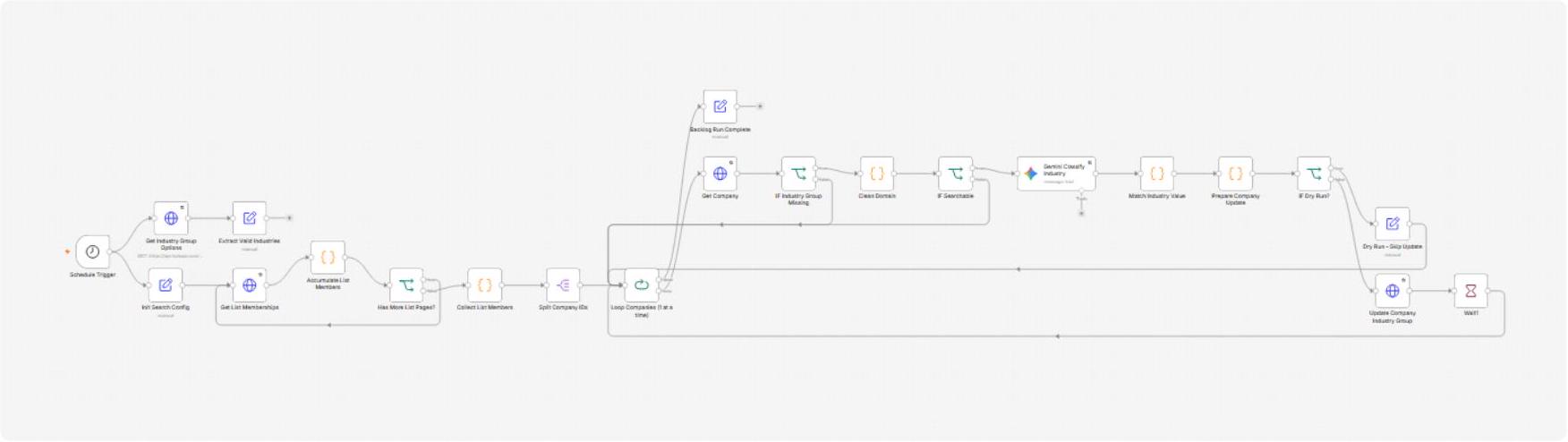
Each run follows the same six stages, from the schedule firing to a company updated in HubSpot.
| Step | Process |
|---|---|
| 1. Schedule and setup | The Schedule Trigger starts the run every hour. Two things happen in parallel: the workflow loads the allowed Industry Group options from HubSpot, and sets its configuration (companies per run, confidence threshold, dry-run flag and the HubSpot list id). |
| 2. Collect the backlog | The workflow pages through the HubSpot list, 250 members at a time, until it has the configured maximum of 100 companies, then splits them into single items. |
| 3. One company at a time | A loop takes each company and fetches its name, domain, website, additional domains and current industry group. Companies that already have an industry group are skipped. |
| 4. Prepare and check | A code node cleans the domains. If a company has neither a domain nor a name, it is skipped because there is nothing to classify. |
| 5. Gemini classification | Gemini receives the name and domain with the list of allowed groups and the classification rules, and returns JSON with the industry, a confidence score and a reason. |
| 6. Validate and write | A code node matches the answer to a real HubSpot option and applies the confidence gate. Unless dry run is on, the result is written to HubSpot, followed by a Wait node before the next company. |
The workflow in n8n
Supporting integrations
- HubSpot: the list of companies to process, the company records, the allowed Industry Group options and the update call.
- Google Gemini: the classification model, with web search switched off so it answers from its own knowledge.
- n8n workflow static data: holds the pages of list members while they are being collected.
Core Workflow Configuration
The workflow is built from a handful of node groups. Settings that a person may want to change are kept together in one Init Search Config node.
| Node group | Configuration |
|---|---|
| Schedule Trigger | Runs every hour. |
| Get Industry Group Options / Extract Valid Industries | Reads the hs_industry_group property definition from HubSpot. Builds the list of allowed labels, leaving out hidden options and Needs R&D (which is added back in the prompt), and keeps the raw options for matching later. Retries up to 3 times, 5 seconds apart. |
| Init Search Config | Sets maxCompanies 100, confidenceThreshold 0.6, dryRun false and listId 638. |
| Get List Memberships / Accumulate List Members / Has More List Pages? | Pages through the HubSpot list 250 members at a time, stores them in workflow static data and stops at the company limit. |
| Collect List Members / Split Company IDs | Trims the collected members to the limit, clears the stored data and splits them into one item per company. |
| Loop Companies (1 at a time) | Processes one company per round. Its finished output goes to Backlog Run Complete, which records the completion time. |
| Get Company | Fetches name, domain, website, additional domains and current industry group from HubSpot. Retries up to 3 times. |
| IF Industry Group Missing | Continues only when the industry group is empty, so companies already classified are never touched again. |
| Clean Domain (code) | Strips protocol, www, paths and ports from the domain, website and additional domains, removes duplicates and builds a clean domain list. |
| IF Searchable | Continues only if the company has at least one domain or a name. |
| Gemini Classify Industry | Gemini Flash at temperature 0.2 with a detailed prompt: allowed groups, group definitions, classification rules and a JSON output format. Web search is off. Retries up to 5 times. |
| Match Industry Value (code) | Reads the JSON from the model, caps the confidence at 0.65 when there is no domain, and matches the chosen group to a real HubSpot option by label, value or a normalized form. |
| Prepare Company Update (code) | Applies the confidence gate and builds the HubSpot properties: the group (or Needs R&D), confidence, a reasoning text cleaned of stray characters and limited to 500 characters, a status and the check date. |
| IF Dry Run? / Dry Run - Skip Update | In dry run mode the update is skipped and the loop continues. |
| Update Company Industry Group | PATCH request to the HubSpot company record. Retries up to 3 times. |
| Wait1 | Pauses before the next company to stay within HubSpot rate limits. |
Classification Rules and Scenarios
What the model is told
Gemini must choose exactly one group from the list HubSpot provides. The prompt defines each group (for example Manufacturing, eCommerce, Retail, Wholesale Distribution, SaaS, Development shop, IT / MSP, Low Voltage, Consulting, Finance, 3PL, Transportation, Energy Rebates and Self Storage) and sets rules for the edge cases:
- Businesses that sell physical products to consumers are never excluded. They go to Retail (walk-in stores) or eCommerce (online-first and direct-to-consumer brands).
- Local consumer services, restaurants, medical and dental practices, schools, religious organizations and home services are marked Needs R&D with full confidence and an excluded flag.
- A company that cannot be identified, or fits none of the groups (such as a law firm or nonprofit), is marked Needs R&D instead of being forced into a group.
- Confidence is 0.80 to 1.0 when the company is clearly known, 0.40 to 0.65 for partial evidence or a name with no domain, and 0.0 when nothing can be verified.
- The answer must be a single JSON object with industry, confidence, excluded and reasoning.
Scenarios
These scenarios show how the workflow treats the main kinds of company. They are illustrative, derived from the prompt and code, and are not recordings of real HubSpot records.
| Scenario | What arrives | What the workflow does | Result in HubSpot |
|---|---|---|---|
| 1. Clearly known business | A company with a domain whose business model the model recognizes, for example a software platform. | Gemini returns the matching group with confidence 0.80 or higher. The code matches it to a HubSpot option and it passes the 0.6 gate. | Industry group set, status updated, confidence and reason saved. |
| 2. Consumer brand | A clothing or electronics brand selling to the public. | Rule 3 sends it to Retail or eCommerce, never to Needs R&D. | Retail or eCommerce group set. |
| 3. Local consumer service | A pizzeria, dental practice or salon. | Excluded under rule 4 with confidence 1.0. | Group set to Needs R&D for a human to see. |
| 4. Unknown company | A company the model cannot identify. | Returns Needs R&D with low confidence, so the gate fails. | Group set to Needs R&D, status low_confidence or unmatched. |
| 5. Name only | A company with a name but no domain. | Confidence is capped at 0.65 in code, so the model cannot be fully sure. | Written only if it still clears 0.6, otherwise Needs R&D with status no_domain. |
| 6. Already classified | A company that already has an industry group. | Stopped by IF Industry Group Missing, no model call. | Unchanged. |
| 7. Dry run | Any company, with dryRun set to true. | Everything runs except the HubSpot update. | Nothing written. |
Results & Metrics
The workflow is built and marked active. No run results were provided, so classification accuracy, the share of companies sent to Needs R&D and the time saved have not been measured.
| Metric | Result |
|---|---|
| Production workflows | 1 |
| n8n nodes | 22 |
| Trigger | Schedule, every hour |
| Companies per run | Up to 100, processed one at a time |
| Industry groups | Read live from HubSpot, so the model cannot pick a value that does not exist |
| Confidence gate | 0.6, with a 0.65 cap when a company has no domain |
| Fields written per company | Industry group, confidence, reasoning, status and check date |
| Safety features | Dry-run switch, skip of already classified companies, Needs R&D fallback, retries on every network and model call |
| Accuracy, volume, time saved | Not measured yet |
Technical Challenges & Solutions
The model could invent a category
Challenge
A free-text answer such as “Software” or “Tech services” does not match any HubSpot option and would break the update or pollute the field.
Solution
The allowed groups are loaded from HubSpot on every run and given to the model to copy exactly. The answer is then matched to a real option by label, value or a normalized form that ignores case, punctuation and “&” versus “and”.
Outcome
Only values that exist in HubSpot can be written.
A weak guess recorded as fact
Challenge
A model will always give an answer, even when it knows nothing about the company.
Solution
The model must return a confidence score, name-only companies are capped at 0.65, and a code node only writes a group when the answer matches an option and reaches 0.6. Everything else becomes Needs R&D, and the confidence, reason, status and check date are saved on the record.
Outcome
Doubtful cases are visible to a person instead of hidden among correct ones.
Processing the same companies again
Challenge
An hourly schedule over the same list would classify the same companies on every run and waste model calls.
Solution
The workflow only continues when the industry group is empty, so each company is processed once.
Outcome
Each run moves on to the next unclassified companies.
Reading a long list from HubSpot
Challenge
The HubSpot list API returns 250 members per page, and the run must stop at a fixed number of companies.
Solution
A loop collects pages in workflow static data until the next page is missing or the limit is reached, then clears the data and splits the members into single items.
Outcome
Runs are bounded and predictable.
Testing without touching real data
Challenge
Changing the prompt or rules on live CRM records is risky.
Solution
A dryRun setting runs the whole flow, including the model call, but skips the HubSpot update.
Outcome
The prompt can be tuned and checked before records are changed.
Open items found in the export
Challenge
Three details in the workflow need checking. The Wait node after each update has an amount of 10 but no unit stored, and n8n’s default unit for that node is hours. The prompt refers to a Seamless Data field that no earlier node fills, so it is always “N/A”. The collected list members sit in static data, so a run that fails halfway through paging could leave old members behind for the next run.
Solution
Open the Wait node and set the unit to seconds. Either feed the Seamless description into the prompt or remove the line. Clear the stored list at the start of each run.
Outcome
Not done yet. These are the first improvements to make.
Key Takeaways & Future Development
Key takeaways
- Let the CRM define the answers: loading the allowed groups from HubSpot keeps the model inside the structure the team already uses.
- Check the model’s output in code: a confidence gate and a strict match to real options decide what is written, not the model alone.
- Send doubt to a person: Needs R&D with a stored reason turns uncertain cases into a review list.
- Make it safe to test: the dry-run switch, retries and the skip of classified companies make the workflow safe to leave running.
Future development
- Set the Wait node unit to seconds and check that the Gemini model id is available in your account.
- Fill the Seamless Data line in the prompt or remove it.
- Clear the stored list members at the start of every run.
- Create a HubSpot view of companies marked Needs R&D, sorted by confidence, so reviewers can work through them.
- Send a short summary after each run (companies processed, written, flagged) using the Backlog Run Complete step.
- Run a measured pilot, compare a sample of results with a person’s choices, and use it to complete the results section.