From a Signed DocuSign Contract to a Master Sheet Row and an Itinerary Slide
Turning a signed DocuSign travel contract into a master sheet row, a filed contract and an itinerary slide, automatically.
 Make Automations
- Make
- DocuSign
- Google Apps Script
- Claude
- Google Sheets
- Google Slides
- Google Drive
Overview
An internal operations automation for a group travel company that manages college formal events.
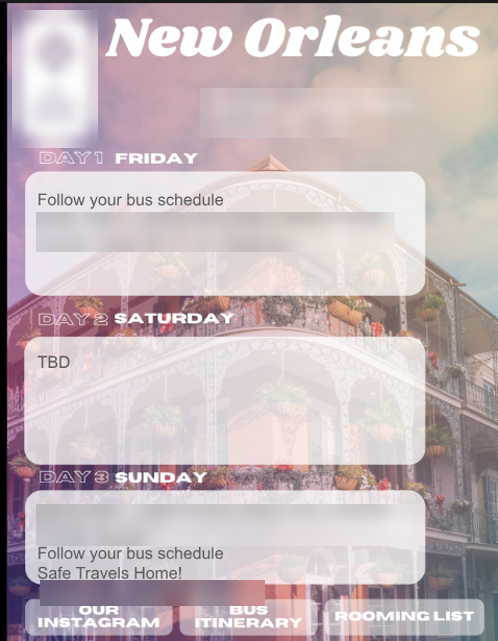
When a group signs a travel contract in DocuSign, the operations team has several follow-up jobs: record the trip in the master ops spreadsheet, file the signed contract in the group’s Drive folder, and produce a Friday/Saturday/Sunday itinerary slide for the group.
This scenario does those three jobs automatically as soon as a DocuSign envelope is completed.
Built with Make, DocuSign, Google Apps Script, Anthropic Claude (claude-sonnet-4-6), Google Sheets, Google Slides and Google Drive.
The Problem
Each signed contract holds the details the team needs in several places: hotel names and room counts, check-in ages, buses, venues, event times, food and bar packages, and payment and task due dates. Moving these by hand into the master sheet, then building a customer-facing itinerary from them, is repetitive and easy to get wrong.
The Solution
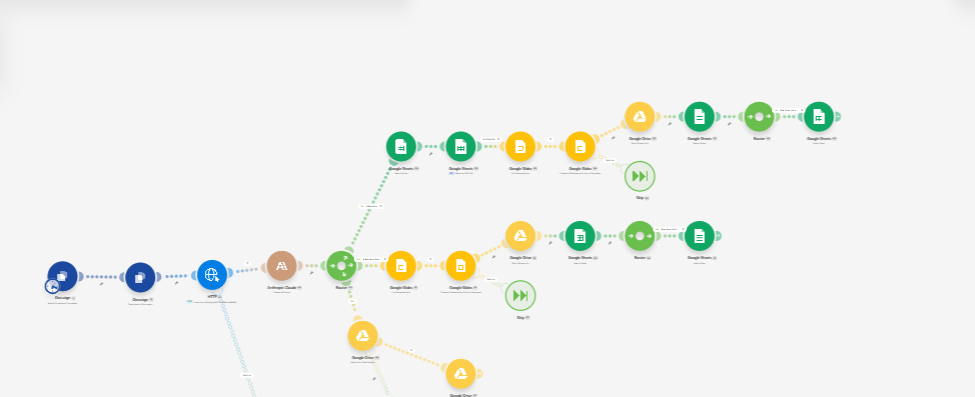
A Make scenario that:
- Triggers when a DocuSign envelope is completed.
- Downloads the signed document.
- Sends it to a Google Apps Script web app, which returns the contract’s fields as structured data.
- Asks Claude to write the three-day itinerary text from those fields.
- Routes the result down three paths: a new-contract path, an addendum path, and an archive path.