Newsletter Performance Agent: Daily Scoring of Every Sent Issue
An n8n workflow that finds each newsletter issue after it is sent, removes machine clicks from the numbers, scores it against the account’s own baseline, and posts an AI analysis to the team.
n8n Automations
Works with
n8n
Kit
Airtable
Claude
Telegram
Purpose
A publisher sends a regular email newsletter through Kit. This n8n workflow scores every sent issue automatically. It pulls the issue’s stats from Kit, corrects the click numbers for machine traffic, compares the result with the account’s own history, asks Claude for an analysis, and shares it with the team.
The Solution
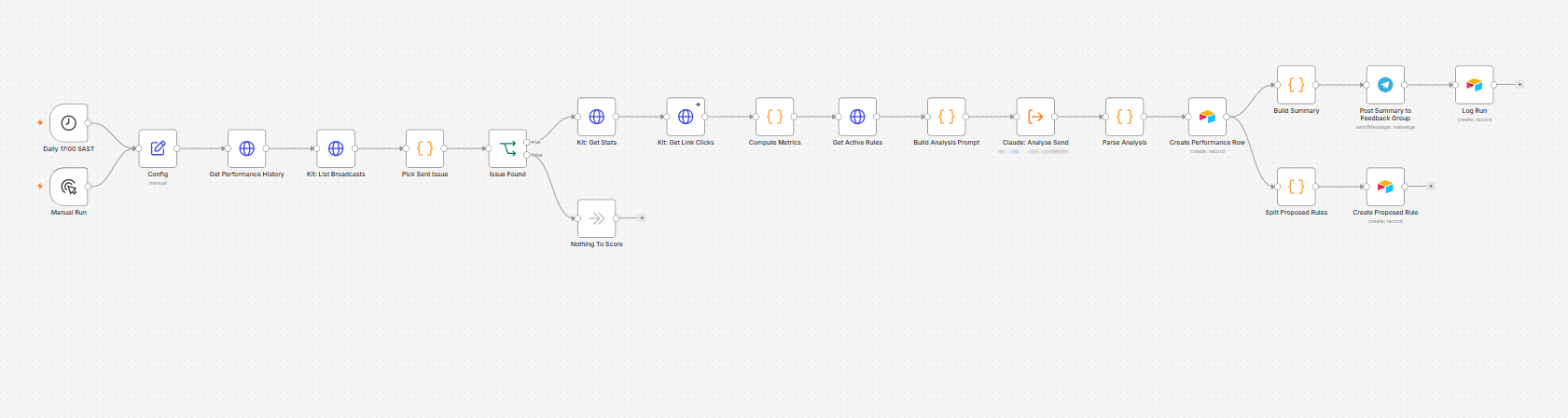
The workflow runs every day at 17:00 South African time, and it can also be started by hand.
It reads the last 40 logged issues from Airtable and the list of broadcasts from Kit.
It picks the newest completed send from the last 36 hours that has not been logged yet. If there is none, it stops with nothing to score.
It pulls that issue’s stats and its link-level clicks from Kit. If the link report is missing, the run carries on and marks the clicks as raw and unverified.
A code step calculates the metrics, as described below.
It reads the active newsletter rules from Airtable, so the analysis does not suggest rules that already exist.
Claude receives the numbers and the rules, and returns its analysis as structured data.
A second code step cleans the text, keeps at most two proposed rules and labels each one “PROPOSAL, not active”.
The result is saved as a new row in the Performance table in Airtable, with the stats, the score, the analysis and the recommendations.
Two things then happen at the same time. A short summary is posted to the team’s Telegram feedback group and the run is logged. Any proposed rules are saved to the Newsletter Rules table as inactive.
The Newsletter Performance Agent in n8n: a daily trigger or a manual run, a look-up of past issues and Kit broadcasts, a step that picks the sent issue, Kit stats and link clicks, the metrics code, the Claude analysis, and an Airtable row. The row then leads to the Telegram summary and run log on one branch, and to the proposed rules on the other.
What the Code Calculates
Machine clicks are removed. Mail security gateways often click every link in a message once. This shows up as a flat plateau across many links, while real readers produce a steep curve. The workflow detects the plateau and subtracts it, which gives an adjusted click rate. Against past sends, raw click rates of 7.73 and 6.64 percent came out at 2.63 and 2.54 percent, and a clean issue was left untouched.
Each issue is scored against a baseline. The baseline is the median open rate and click rate of past issues. Segment sends, with fewer than half the usual recipients, are left out. A score of 1.00 means the issue was on the baseline.
Clicks are attributed to products and positions. They are grouped by the campaign tag in each link, with the date suffix removed so that a trend can form over time, and by the slot tag that marks where the link sat in the issue.
Anything doubtful is flagged. The flags cover missing link data, segment sends and links without a dated campaign tag, and they travel with the analysis.
What the AI Is Told
Adjusted click figures are the truth. A raw click number is never called a win, and if raw and adjusted disagree, it says so.
Sales cannot be measured here, so clicks on a product link count as interest, never as revenue.
Do not propose rules that are already in force. Propose a new rule only when the evidence supports it, zero is a good answer, and each one must state its evidence.
Keep it short: an analysis of two paragraphs at most, no more than three recommendations, and a Telegram summary under 600 characters. Do not invent data.
Good to Know
The agent suggests but never decides. Proposed rules stay inactive until a person ticks Active in Airtable, and only then do they reach the writing prompts.
Each issue is scored once, because it is logged by its Kit broadcast ID and send date.
The summary lands in Telegram, the full write-up sits in Airtable, and every run is logged.
 n8n Automations