Two n8n workflows that find athlete news, draft the post, and publish it to Instagram once a person approves.
n8n Automations
Works with
n8n
Instagram
Claude
Google Sheets
Gmail
Placid
Purpose
PeakNIL connects college athletes with brands for NIL deals. To stay visible and attract brands, it needs a steady stream of social media posts celebrating athlete achievements. These two workflows automate that process, from finding the news to publishing on Instagram, with a human approving every post.
The Problem
PeakNIL has hundreds of athletes across 28 sports, and someone has to check news about each of them.
Staff must decide which stories are worth posting, write captions, find usable photos, design graphics and publish.
Doing this by hand is slow and expensive, and it can’t keep up with fast-moving sports news.
Posting is inconsistent, so some athletes get covered and others are missed.
Athlete records are often incomplete, which makes tracking harder.
Posts must stay positive and brand-safe, with no injuries, losses or controversies.
The Solution
Two connected automations handle the work, and a person approves the result.
Workflow 1: Athlete Monitor (finds and drafts)
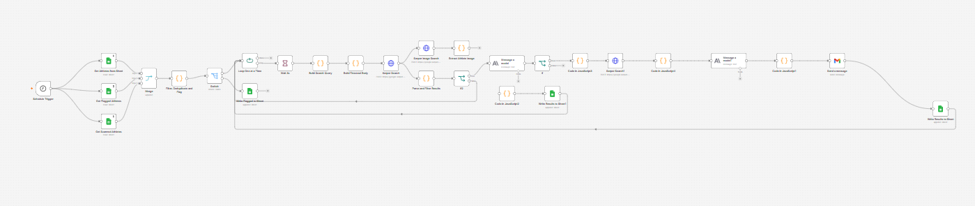
Runs every weekday and picks athletes from the roster sheet. It skips anyone with missing data or scanned in the last 3 days.
Searches for recent news (last 3 days) from trusted sports sources.
Claude decides whether the story is worth posting, assigns a content category, and writes the caption and a short headline.
Finds a clean photo of the athlete and emails the draft to the content manager for review.
Workflow 1, Athlete Monitor: a schedule trigger reads the roster from Google Sheets, searches for news, has Claude draft the post, and emails it to the content manager through Gmail.
Workflow 2: Reply Detection (approves and publishes)
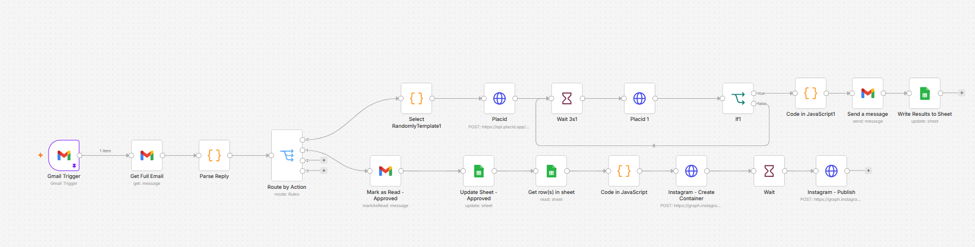
The manager replies to the email with an image number or “approve”.
The workflow reads the reply, builds a branded graphic with the chosen photo and headline, and sends it back for a final check.
Once approved, it publishes the post to Instagram and updates the tracking sheet.
Workflow 2, Reply Detection: a Gmail trigger reads the manager’s reply, then one branch builds the graphic with Placid and another publishes to Instagram after approval.
The Result
Content creation drops from hours of manual work to a quick reply by email.
Posting is consistent across the whole roster.
Only positive, relevant stories go out, and nothing publishes without human approval.
Incomplete athlete records are flagged automatically so the team can fix them.
 n8n Automations