Support Email to ClickUp Ticket Automation
Turning every email sent to a shared support inbox into a correctly routed, duplicate-free ClickUp ticket through one n8n workflow.
 n8n Automations
 ClickUp Setups
- n8n
- ClickUp
- Gmail
Overview
This project is a support-intake automation for RefureTech. Customers email the shared support address, and the n8n workflow reads each message, works out which client it belongs to from the sender’s email domain, and files it in ClickUp. It becomes a new ticket in that client’s support list, a ticket in a triage list when the client is unknown, or a comment when a ticket for the conversation already exists. Attachments and earlier messages in the thread travel with it.
The business problem
Support requests arrive as ordinary email. Copying them into a ticket system by hand is slow and easy to get wrong: the wrong client, a missed reply, an attachment left behind in the inbox. The work grows with every new client. Automating it is not simple either, because ClickUp has its own Email ClickApp that sends a confirmation to the customer and files later replies as comments. A naive automation creates duplicate tickets or, worse, turns its own confirmation emails into new tickets in an endless loop.
The solution
A single n8n workflow polls the support inbox every minute. It looks up the client list stored in ClickUp, matches the sender by domain, checks four different ways whether the conversation already has a ticket or is already managed by ClickUp, and only then creates a ticket or comment. It uses plain, explainable rules in code nodes rather than an AI model, so every decision can be traced to a header, a subject line or a ClickUp field. Wherever a step could fail, the workflow prefers a duplicate ticket over a lost customer email.
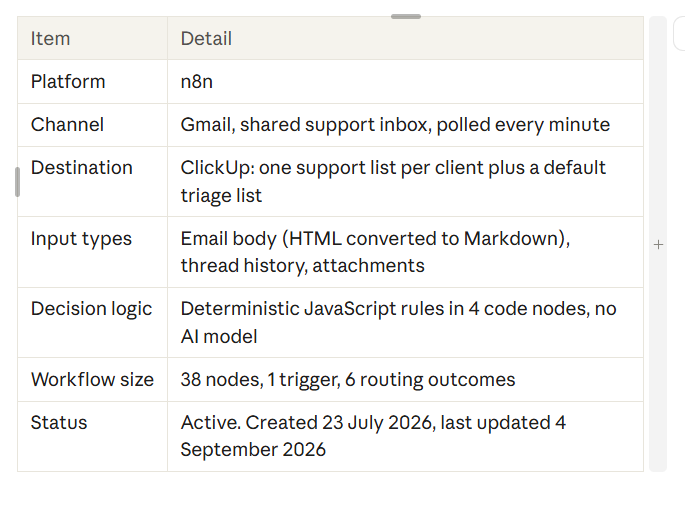
Project snapshot
How the System Works
Every email passes through six stages, from arrival in the inbox to a ticket in ClickUp, inside one workflow.
| Step | Process |
|---|---|
| 1. Email input | The Gmail Trigger polls the INBOX label every minute. The full message is fetched and its HTML body is converted to Markdown so it reads cleanly inside a ticket. |
| 2. Client matching | The workflow reads the client list from ClickUp, where each client has a Domain, a folder id and a support list id. A code node picks the customer contact from the To, Cc and From addresses and matches its domain (or a parent domain) to a client. Free-mail and internal domains are never mapped. |
| 3. Duplicate checks | Three lookups run: a ClickUp search by Gmail thread id, a ClickUp search by the thread ClickUp’s own confirmation email started, and a fetch of the full Gmail thread history. |
| 4. Decision | Route Decision labels the email new, default, comment or skip. Two guard nodes can still turn a write into a skip: one if ClickUp’s ticket id is at the end of the subject, one if the mail headers show a machine-generated reply. |
| 5. Ticket action | A Switch creates a ticket in the client’s list, creates a ticket in the triage list, or adds a comment to the existing ticket. The description holds the new message plus earlier messages in the conversation. |
| 6. Attachments, label, sync | Attachments are downloaded and uploaded to the ticket, and the Gmail message is labelled as processed. For new tickets the workflow waits two minutes, finds ClickUp’s confirmation email and stores its thread id on the ticket so later replies are recognised. |
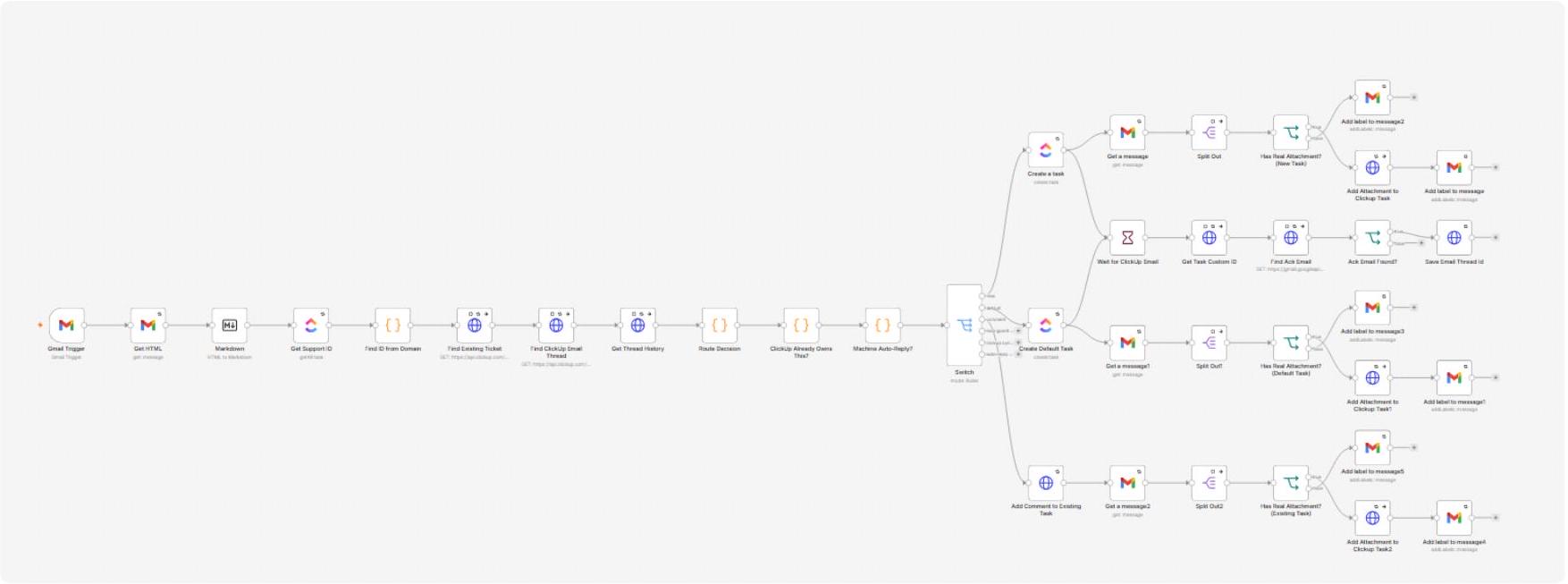
The workflow in n8n
Supporting integrations
- Gmail: trigger, message fetch with attachments, thread history, and labelling processed messages.
- ClickUp: client routing data, ticket and comment creation, attachment upload, and custom fields that store the Gmail thread id and ClickUp’s email thread id.
- Error workflow: a separate n8n workflow is attached in the settings to handle failures of this one.
Core Workflow Configuration
The workflow is built from a handful of node groups. Each has a single job, and the routing decision is carried forward as one item holding the same fields (contact, domain, folder, list, thread id, reason, action), so the ticket nodes never need to know how the decision was reached.
| Node group | Configuration |
|---|---|
| Gmail Trigger | Polls every minute, restricted to the INBOX label on purpose. ClickUp sends its confirmation as the support address, which leaves a copy in Sent. Polling Sent would turn that confirmation into a ticket and trigger another confirmation, forever. |
| Get HTML + Markdown | Fetches the full message and converts the HTML body to Markdown. Retries up to 3 times, 2 seconds apart. |
| Get Support ID | ClickUp node that lists the client tasks. Each carries the custom fields Domain, folder_id and support_list_id. |
| Find ID from Domain (code) | Builds a domain-to-client map, ignores free-mail and internal domains, records domain collisions, picks the customer contact (mapped client first, then any external address, then the sender), validates every address, fills up to 20 Cc fields and applies the one hard skip: the self-addressed ClickUp acknowledgment. |
| Find Existing Ticket / Find ClickUp Email Thread | Two ClickUp API searches by custom field: the Gmail thread id, and the thread id of ClickUp’s own confirmation. If either call fails the workflow continues with no result, so a ticket is still created. |
| Get Thread History | Gmail API call for every message in the conversation. Failure is non-fatal: the ticket is created with the newest email only. |
| Route Decision (code) | Decides clickup_synced, comment, new or default, and assembles the ticket description with the earlier messages, capped at 60,000 characters. |
| ClickUp Already Owns This? (code) | Skips when the subject ends with a ClickUp ticket id such as #RTS-1234, or the confirmation wording is found. Anchored to the end of the subject so a customer’s own mid-subject reference such as #PO-88231 still gets a ticket. |
| Machine Auto-Reply? (code) | Skips out-of-office and bounce mail by reading headers (Auto-Submitted, X-Auto-Response-Suppress, Precedence, empty Return-Path), never the subject wording. |
| Switch | Six rules: new, default, comment, loop guard (skip), ClickUp synced (skip), auto-reply (skip). The fallback output goes to the triage list so an unexpected value cannot drop an email. |
| Create a task / Create Default Task | ClickUp nodes that create the ticket with the Markdown description, customer contact, recipient, up to 20 Cc contacts and the Gmail thread id as custom fields. Tickets opened mid-chain are titled with an [Ongoing thread] prefix. |
| Add Comment to Existing Task | Posts the new email as a comment on the tracked ticket without notifying everyone. |
| Attachment branches (3 sets) | Re-fetch the message with attachments, split them out, keep only files with a real file extension, upload them to the ticket and add the Gmail label. Emails without attachments still reach the label step. |
| Wait + confirmation sync | Waits 2 minutes, re-reads the task for its custom id, searches Gmail for ClickUp’s confirmation and saves its thread id into the ticket so future replies are recognised. |
Product Experience and Routing Scenarios
Every email the workflow has handled is marked with a Ticketed label in Gmail, so the team can see at a glance which messages already have a ticket or comment in ClickUp. Replies on the same conversation carry the label too.
Routing scenarios
These scenarios show how the workflow treats the main kinds of email. They are illustrative, derived from the workflow logic, and are not recordings of real customer emails.
| Scenario | What arrives | What the workflow does | Result |
|---|---|---|---|
| 1. Mapped client, new request | A first email from someone at a client whose domain is in the ClickUp client list. | Matches the domain, finds no existing ticket, routes to the client’s folder and support list, uploads attachments, labels the email, then syncs ClickUp’s confirmation thread id after 2 minutes. | New ticket in the client’s support list. |
| 2. Unknown domain | An email from a domain that is not mapped, or with no usable contact address. | Falls to the default branch. The ticket is still created, in the default triage list, with the sender as contact. | New ticket in the triage list for a person to assign. |
| 3. Reply on a tracked conversation | A follow-up where a ticket already exists for the Gmail thread but ClickUp does not own the thread. | Finds the ticket by the Gmail thread id custom field and posts the email as a comment, then handles any attachments. | Comment and files added to the existing ticket. |
| 4a. ClickUp-owned reply | A customer reply whose subject ends with a ClickUp ticket id. | Stops without writing. ClickUp’s Email ClickApp is already filing replies as comments, so acting would duplicate the ticket. | Skipped, no duplicate. |
| 4b. Out-of-office or bounce | A vacation responder or delivery failure notice. | Detected from mail headers and skipped. A colleague’s real reply on the same thread is not skipped, because headers are checked instead of subject words. | Skipped, real replies kept. |
| 4c. Our own confirmation | The ClickUp acknowledgment, sent from the support address back to the support address. | Hard skip by the loop guard. | Skipped, loop prevented. |
Results & Metrics
The workflow is live and has run on the real support inbox. Business figures such as hours saved, tickets per week and routing accuracy have not been measured yet.
| Metric | Result |
|---|---|
| Production workflows | 1 main workflow, plus an error workflow attached in settings |
| n8n nodes | 38 |
| Trigger | Gmail polling every minute, INBOX only |
| Routing outcomes | 6: new, default, comment, and three skip outcomes |
| Duplicate guards | 4 layers: Gmail thread id, ClickUp email thread id, ticket id in subject, confirmation wording |
| Failure handling | Retries up to 3 times, 2 seconds apart, on every network node. Lookups fail open, so an email becomes a ticket rather than being lost. |
| Reply channels covered | Mapped client, unknown domain, existing thread, attachments |
Execution history (29 Sep to 12 Oct 2026)
| Metric | Result |
|---|---|
| Executions retained in n8n | 11 |
| Successful | 11 (100%) |
| Failed or crashed | 0 |
| Run time | 9 runs took about 2 minutes (the path with the built-in 2-minute wait for ClickUp’s confirmation). 2 runs took about 4 seconds (paths without that wait). |
| Hours saved, accuracy, duplicate rate | Not measured yet |
The execution count reflects only the executions n8n still retains and is not a full volume figure. The link between run time and path is inferred from the workflow design.
Technical Challenges & Solutions
Most of the engineering effort went into edge cases around ClickUp’s own email feature and around real-world email, where a simple “new email creates ticket” flow breaks quickly.
The workflow could answer itself forever
Challenge
ClickUp sends its confirmation email from the support address, so a copy lands in Sent. If the workflow read Sent, that confirmation would become a ticket, which triggers another confirmation, and so on.
Solution
The trigger watches INBOX only, and a loop guard in code skips any email sent from the support address with the support address in To or Cc. It is the only unconditional skip.
Outcome
The loop is closed twice, at the trigger and in the logic.
Duplicate tickets next to ClickUp’s Email ClickApp
Challenge
Once a ticket exists, ClickUp already files replies as comments and sends its own acknowledgment. Creating another ticket from the same reply duplicates work and makes ClickUp send the customer a second acknowledgment.
Solution
Four independent checks decide whether ClickUp owns the conversation: a stored ClickUp email thread id, the ticket id at the end of the subject, the confirmation wording in the thread, and the Gmail thread id on an existing ticket. The subject check is the most dependable, because older tickets lack the stored thread id and the confirmation wording can change.
Outcome
Replies on ClickUp-managed conversations are skipped and n8n stays out of the way.
Out-of-office mail versus a colleague covering for someone
Challenge
An auto-reply sets the subject to “Out of Office Re: …”. A colleague who replies on the same thread keeps that subject, so matching subject words would silently drop a genuine customer email.
Solution
The check reads mail headers that no human mail client sets (Auto-Submitted, X-Auto-Response-Suppress, Precedence, empty Return-Path). If the headers cannot be matched confidently to the right message, nothing is skipped.
Outcome
Machine mail is filtered out, and real replies with the same subject still become tickets.
A duplicate is acceptable, a lost email is not
Challenge
Lookups against ClickUp and Gmail can fail, and an email that stops the workflow is a customer who never gets answered.
Solution
The ticket-search and thread-history calls retry three times and then continue with no result. Missing results default to creating a ticket, the Switch fallback sends unknown outcomes to the triage list, and the split-out steps continue on error so every email still reaches the labelling step.
Outcome
Failures become an extra ticket or less context, never a dropped message.
Tickets opened in the middle of a conversation
Challenge
When the first email the workflow sees is already a reply, a ticket with only the latest message has no background.
Solution
The full Gmail thread is fetched, earlier messages are sorted by date and appended to the ticket description (with sender, recipient, date and subject), capped at 60,000 characters, and the title gets an [Ongoing thread] prefix.
Outcome
A person opening the ticket sees the whole conversation.
Malformed addresses breaking ticket creation
Challenge
ClickUp rejects the whole task when an email-typed field receives something that is not an address, such as a group name or undisclosed-recipients. Messy Cc lines and display names are common.
Solution
Header values are normalised, every address is validated, the support address is never mapped into contact fields, and Cc contacts are capped at 20 fields with the overflow count recorded.
Outcome
Odd headers no longer cause ticket creation to fail.
Secrets inside the workflow (open item)
Challenge
The ClickUp API token is written directly into the Authorization header of 8 HTTP Request nodes instead of an n8n credential, so it is visible to anyone who can open or export the workflow.
Solution
Create a ClickUp credential in n8n, switch those nodes to it, and rotate the token.
Outcome
Not done yet. The token is deliberately not reproduced in this document.
Key Takeaways & Future Development
Key takeaways
- Design for the tool next door: the hardest part was coexisting with ClickUp’s own email automation, not creating tickets. Layered duplicate checks solved it.
- Headers over words: deciding on machine-readable signals, such as mail headers and a ticket id anchored to the end of the subject, keeps genuine emails from being filtered out.
- Fail open: choosing a duplicate over a lost email at every failure point makes the automation safe to leave running on a customer-facing inbox.
- Configuration in ClickUp, not in code: adding a client means filling in three fields on a ClickUp task, with no change to the workflow.
Future development
- Move the ClickUp token into an n8n credential and rotate it.
- Log every skipped email (loop guard, ClickUp-owned, auto-reply) to a sheet or channel so skips can be audited.
- Surface the domain collisions the code already detects, for example with an alert, so two clients cannot silently share a domain.
- Replace the fixed 2-minute wait with a short retry loop that looks for ClickUp’s confirmation email.
- Merge the three near-identical attachment branches into one shared sub-workflow.
- Run a measured pilot and record tickets per week, time saved, routing accuracy and duplicate rate to complete the results section.