WhatsApp Voice & Business Agent with n8n
Turning customer voice notes, photos and text messages on WhatsApp into instant, database-backed answers through an n8n workflow.
 n8n Automations
 AI Agents for WhatsApp
- n8n
- Supabase
- OpenAI
- Shopify
Overview
This project is a WhatsApp business assistant for an online store. Customers write, speak or send a photo, and the workflow replies on WhatsApp with facts taken from the store’s Supabase product database, answering by voice when the customer used voice. It runs on n8n cloud with OpenAI models and replaces manual answering of repetitive product questions.
The business problem
Store owners answer the same questions all day: is this in stock, what does it cost, how long is delivery. Customers send these as voice notes, typed messages or screenshots of a product, so a simple keyword bot cannot read them. Slow replies lose sales, and a bot that guesses prices or stock damages trust.
The solution
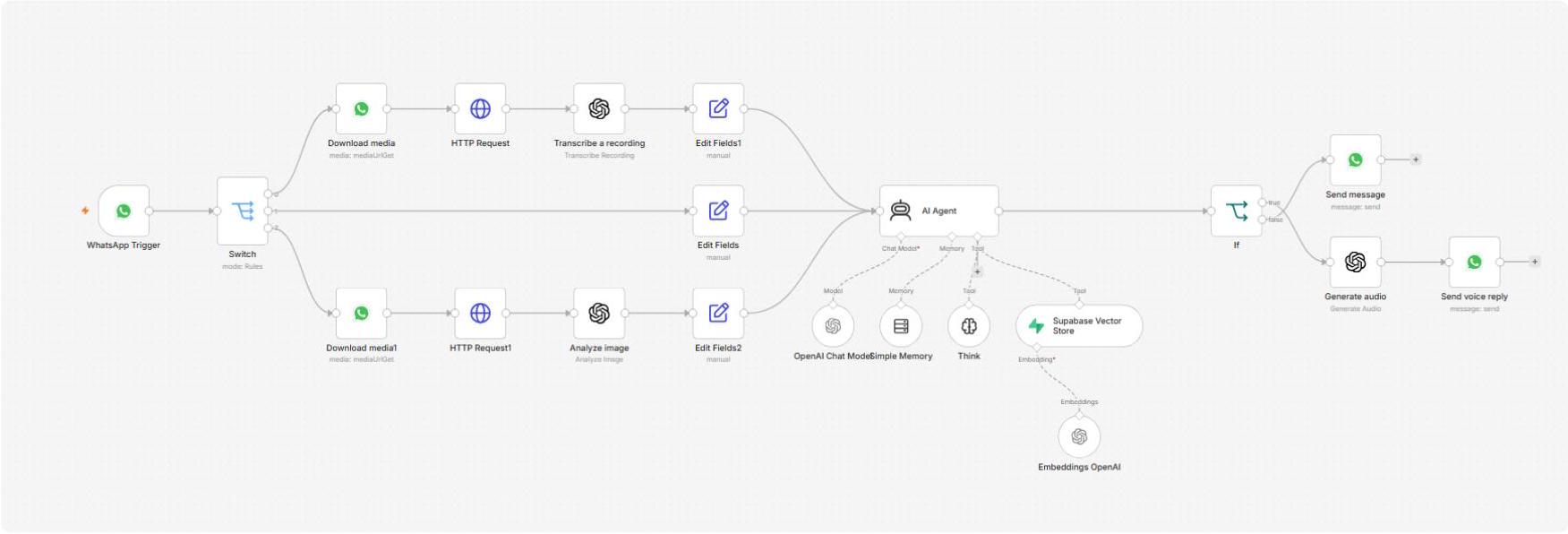
An n8n workflow receives every WhatsApp message and routes it by type. Voice notes are transcribed, photos are described by a vision model, and text goes straight through. All three are normalized into one message and passed to an AI agent that must look up facts in Supabase before answering. The reply goes back as text, or as a voice note when the customer sent audio. Memory keyed on the customer’s phone number keeps the conversation connected.
Project snapshot
| Item | Detail |
|---|---|
| Platform | n8n cloud |
| Channel | WhatsApp Business Cloud API |
| Input types | Voice note, text, photo |
| AI models | OpenAI transcription, GPT-4o-mini vision, GPT-4.1-mini agent, OpenAI speech |
| Knowledge base | Supabase vector store, products table |
| Workflow size | 21 nodes after cleanup (22 in the first export) |
How the System Works
Every message passes through six stages, from the customer’s WhatsApp message to the reply, in a single n8n workflow.
| Step | Process |
|---|---|
| 1. WhatsApp input | The customer sends a voice note, a text or a photo. The WhatsApp Trigger node receives it. |
| 2. Routing | A Switch node checks the message type and sends it down the audio, text or image path. |
| 3. Media handling | Voice notes and photos are downloaded through the WhatsApp media API. A voice note is transcribed and a photo is described by a vision model. |
| 4. Normalizing | Edit Fields nodes turn each path into the same two fields: the message text and the customer’s phone number as session id. |
| 5. AI agent | The agent looks up facts in the Supabase products table, thinks again, and writes a short reply. It remembers the conversation by phone number. |
| 6. Reply | If the customer sent audio, the reply is converted to speech and sent as a voice note. Otherwise it is sent as text. |
The workflow in n8n
Supporting integrations
- WhatsApp Business Cloud API: receives customer messages, downloads media and sends replies.
- OpenAI: transcribes audio, describes images, runs the agent (GPT-4.1-mini) and creates the spoken reply.
- Supabase: vector store over the products table, queried by the agent as a tool.
- n8n Simple Memory: keeps recent messages per customer phone number.
Core Workflow Configuration
The workflow is built from a handful of node groups. Each one has a single job and passes the same two fields forward, so the agent never needs to know how the message arrived.
| Node group | Configuration |
|---|---|
| WhatsApp Trigger | Listens for message updates from the WhatsApp Business Cloud API. |
| Switch | Three rules: audio (by mime type), text (by message type) and image (by mime type). |
| Download media + HTTP Request | Gets the media URL from WhatsApp, then downloads the file with the WhatsApp credential. Used for both audio and images. |
| Transcribe a recording | OpenAI audio transcription of the downloaded voice note. |
| Analyze image | OpenAI vision (GPT-4o-mini) on the downloaded photo, returned as a text description. |
| Edit Fields (three) | Set userMessage (the text, transcript or image description) and sessionId (the customer’s phone number). |
| AI Agent | GPT-4.1-mini with a system prompt: short WhatsApp-style replies under 80 words, one emoji at most, never guess, answer only from the database, hand complex issues to human support. |
| Simple Memory | Window memory keyed on the customer’s phone number. |
| Supabase Vector Store | Retrieve-as-tool on the products table, with OpenAI embeddings. |
| Think | A reasoning tool the agent can use before answering. |
| If | Checks whether the original message was audio. |
| Generate audio + Send voice reply | Turns the answer into speech and sends it back as an audio message. |
| Send message | Sends the answer as a WhatsApp text message. |
Product Experience
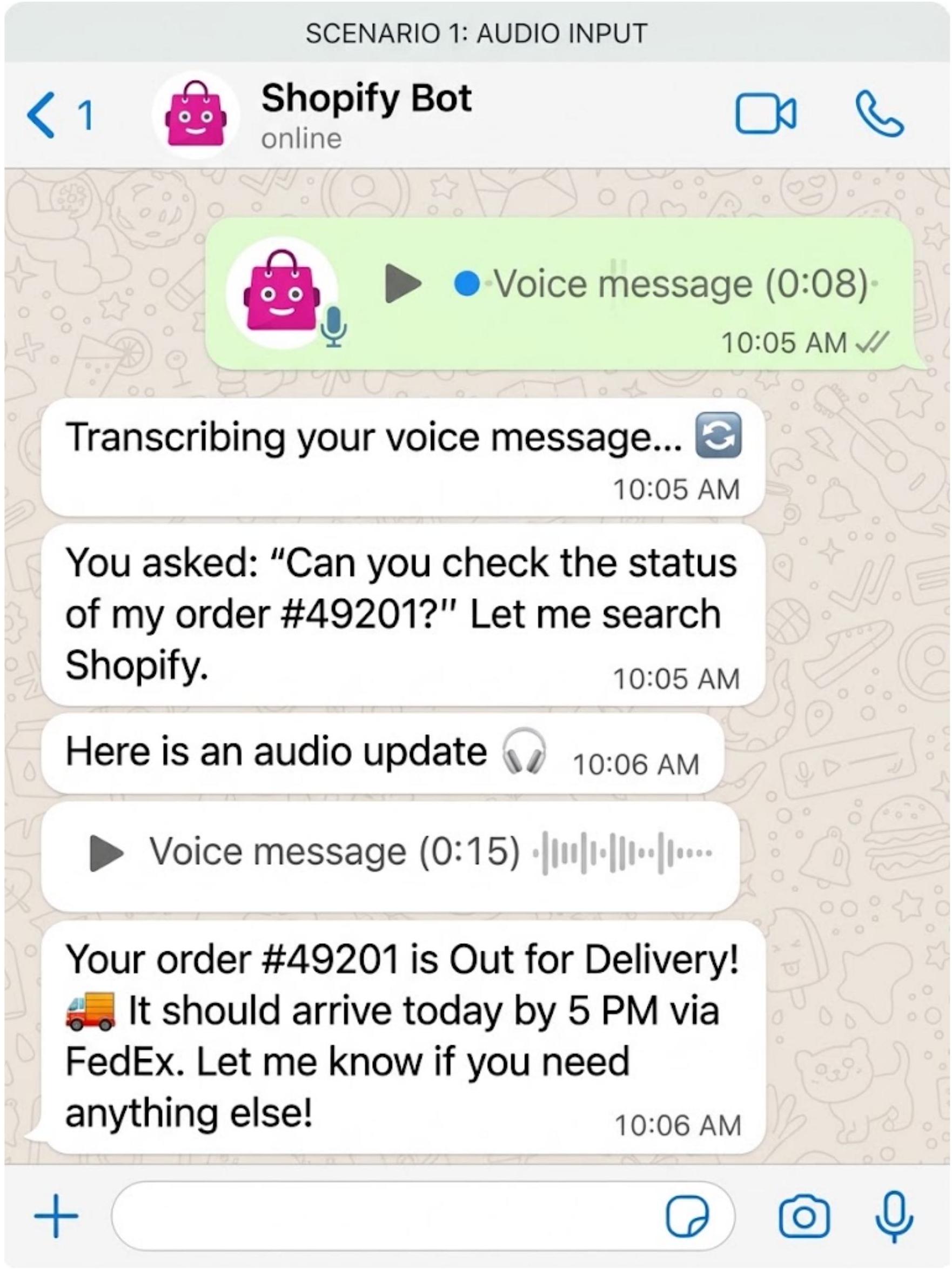
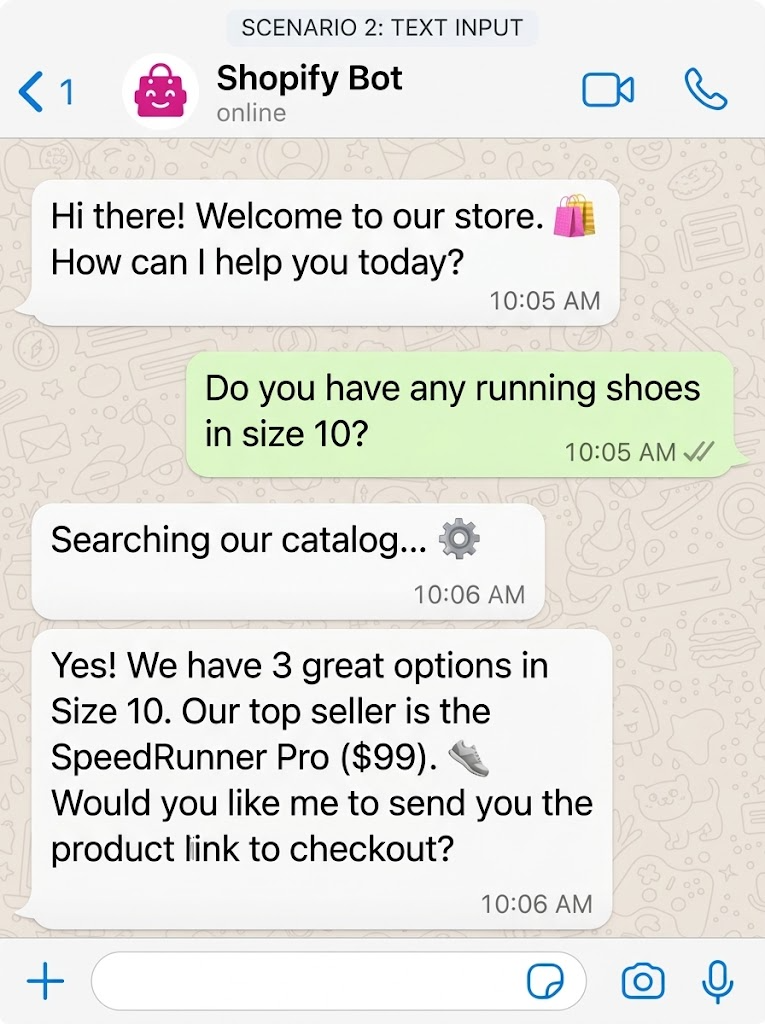
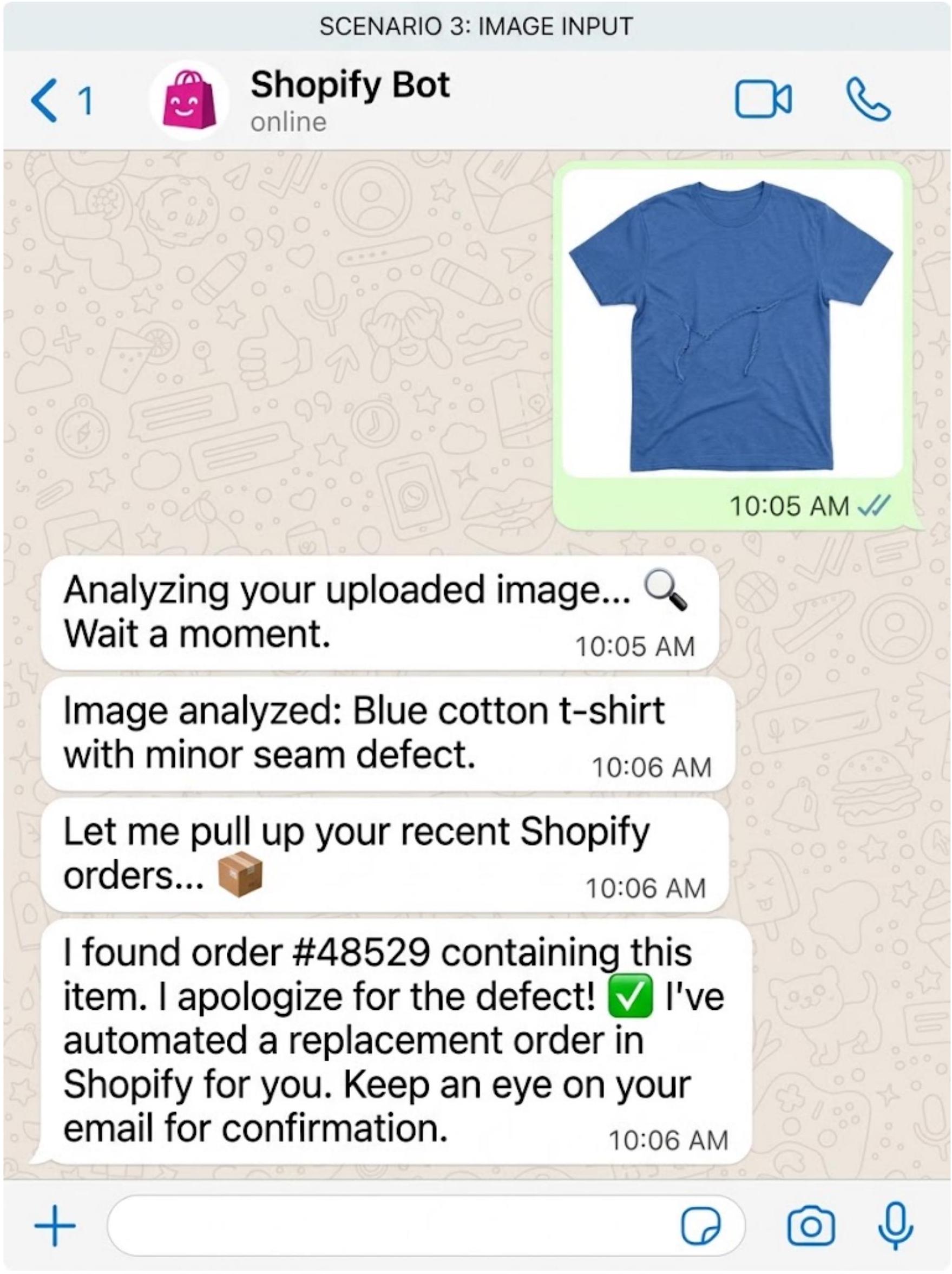
These three mockups show how the assistant is meant to feel on the customer’s phone, one for each input type. They are illustrative designs, not screenshots of live conversations. The status messages (“Transcribing…”, “Searching our catalog…”) and the Shopify order lookup and replacement order shown in scenarios 1 and 3 are not in the current workflow and belong to a planned extension.
Scenario 1: voice input
Scenario 2: text input
Scenario 3: image input
Results & Metrics
The workflow is built and cleaned up, and no live customer data has been measured yet. The figures below describe what was delivered. Response time, accuracy and conversion numbers should be added after a pilot with real conversations.
| Metric | Result |
|---|---|
| Production workflows | 1 main agent workflow |
| n8n nodes | 21 after cleanup |
| Input types supported | 3: voice note, text, photo |
| Reply formats | 2: text and voice note |
| AI models used | 4: transcription, vision, agent, speech |
| Knowledge source | Supabase products table, searched by the agent as a tool |
| Workflow defects fixed | 2 (placeholder Code node, wrong message type) |
| Live response time and accuracy | Not measured yet |
Technical Challenges & Solutions
Reviewing the exported workflow turned up problems that would have stopped it from working in production.
Voice reply could not be sent
Challenge
The voice path ended in a Code node that still held the placeholder YOUR_BASE64_STRING_HERE, and the send node used the document message type.
Solution
Removed the Code node, connected “Generate audio” directly to the send node, renamed it “Send voice reply”, and set its message type to audio with the customer’s number as recipient.
Outcome
The voice path is complete from the audio message to the voice reply.
Credentials missing after import
Challenge
After importing the workflow into a new n8n account, every WhatsApp, OpenAI and Supabase node showed a warning.
Solution
Reselect the credentials on each flagged node. For presentations, a demo copy with sample output pinned on the main-path nodes can be used.
Outcome
The nodes can be run green once credentials are set. A demo copy was prepared for the voice path.
AI answers must stay factual
Challenge
A sales assistant that invents prices or stock levels loses customer trust.
Solution
The system prompt requires the agent to retrieve facts from Supabase before answering, to ask when data is missing, and to hand complex issues to human support. Replies are capped at 80 words.
Outcome
Answers stay short and grounded in the product table.
Secrets inside workflow files
Challenge
A related Shopify workflow contains an access token written directly into its HTTP nodes.
Solution
Rotate the token and move it into an n8n credential before sharing or publishing that workflow.
Outcome
Open item, to be done by the store owner.
Key Takeaways & Future Development
Key takeaways
- One agent for three input types: routing by message type and normalizing to the same two fields keeps the agent simple.
- Grounded answers: forcing a database lookup before every reply is what keeps the assistant safe to put in front of customers.
- Voice in, voice out: answering in the customer’s own format makes the assistant feel natural on WhatsApp.
Future development
- Connect Shopify so the agent can check order status and create replacement orders, as shown in the mockups.
- Add progress messages such as “Transcribing your voice message” while longer steps run.
- Hand over to a human on WhatsApp, with the conversation passed to the support team.
- Run a pilot with real customers and record response time, answer accuracy and sales conversion.
- Move secrets such as the Shopify token into n8n credentials.